Skip to content
NG Operations
Production planning

Production planning software: plan by line and shift, from customer order to warehouse.

NG Operations builds your production plan as a grid of lines, days and shifts: customer orders become production orders in one step, and work orders are scheduled and moved by drag and drop. When the plan is ready, work orders go to the warehouse in one click, and the material actually issued and the quantities produced come back to the same order — no manual entry. Planners can see at any moment what is scheduled, what is running late and how busy each line is.

  • Line × day × shift
  • Built from customer orders
  • Release to the warehouse
  • Plan vs actual

Free consultation and a demo on your own processes.

The NG Operations planning cycle: Sales plan → Materials and packaging → Purchasing → Production plan → Laboratory → Customer delivery. NG WMS — the warehouse executes the plan: what arrives from suppliers, what gets produced, what goes to customers; actuals flow back into the plan.

In the application

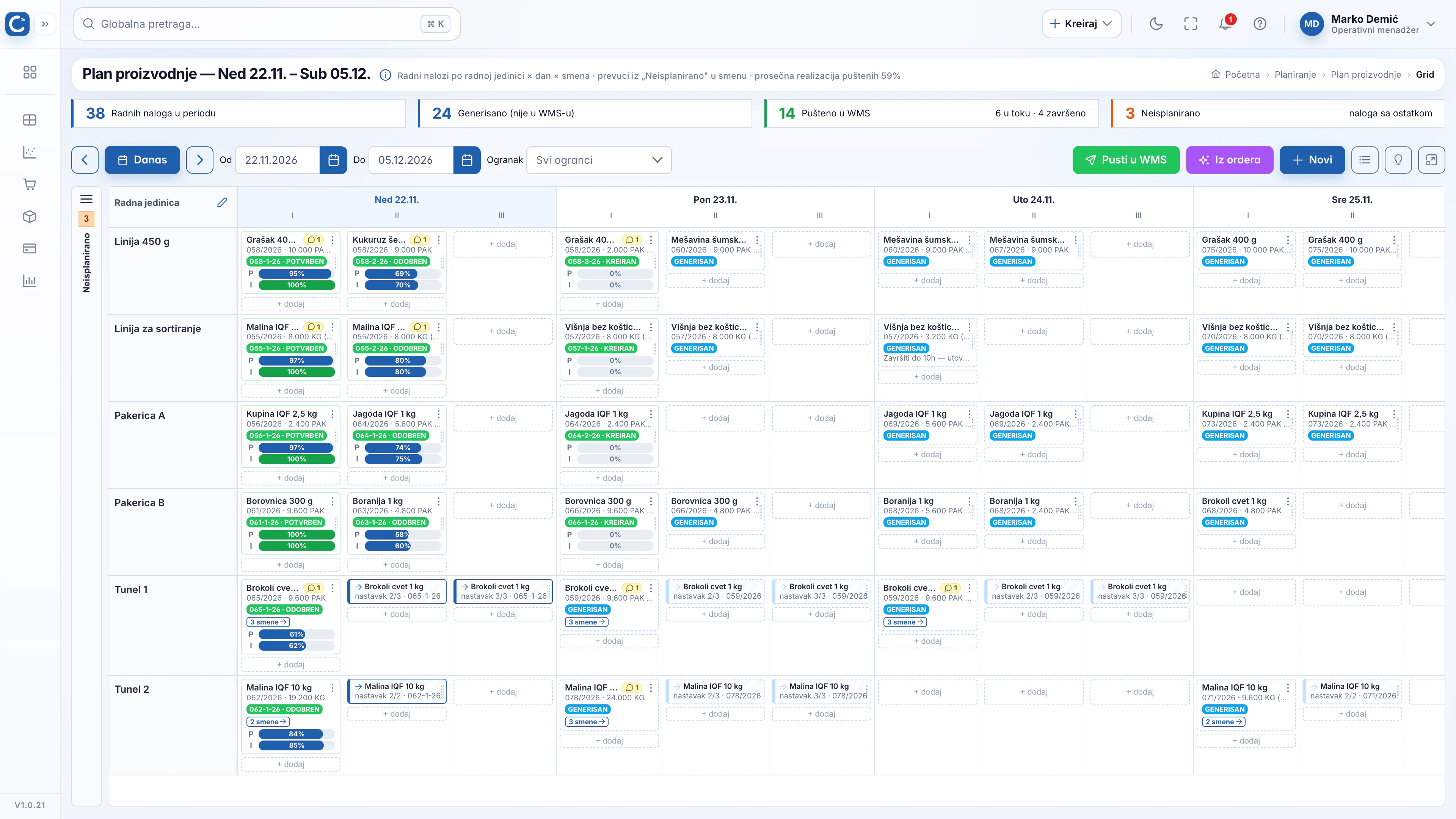
The NG Operations production plan: six lines across three shifts by day, work orders with status and plan-versus-actual bars for consumption and output, orders spanning several shifts and a period summary
The production plan by line, day and shift: today’s orders show plan versus actual, and tomorrow’s are already released to the warehouse.Screenshot with fictional demo data. Click for full size.
Capabilities

What you get in production planning

A plan that is quick to build, changes with a single move and stays connected to orders, bills of materials and the warehouse — no side spreadsheets.

  • Plans by line, day and shift

    The whole plan is on one screen: each row is a line or work centre, each column a day, and every day has three shifts. Today is highlighted, non-working days are marked, and you page through the plan week by week.

  • Production orders from customer orders in one step

    A wizard reads customer orders for the loading period you choose and turns each one into a production order with all its products, calculating raw materials and packaging from the bill of materials. Orders that are already planned are not offered again.

  • Scheduling by drag and drop

    Drag unplanned products into a shift and a work order is created. When something changes, move an order to another day, shift or line in one move, and split a large job by quantity across several shifts.

  • Automatic plan proposals and optimisation

    NG Operations suggests the production day from the loading date and spreads orders across shifts, and it can also optimise the plan automatically. The planner reviews the proposal, moves what needs moving and confirms it — the final say stays with them.

  • Multi-shift orders that skip non-working days

    An order that runs longer is stretched across several shifts with the mouse. The calendar of non-working days — weekdays and public holidays — is respected, so a job that starts on Saturday carries on by itself on Monday.

  • One-click release to the warehouse

    Send today’s and tomorrow’s work orders to the warehouse in one click. Link each raw material in the recipe to a specific item code by available stock, or let the system allocate it, and approving the order gives the warehouse its material issue, finished goods receipt and return.

  • A shop-floor order ready to print

    The printed production order carries cartons, pallets, net and gross weight, a suggested lot and expiry date, customer instructions and photos of labelling and stacking — all assembled from the order, the bill of materials and the customer record.

  • Plan vs actual, with no typing

    Consumption and output bars compare the plan with what the warehouse actually issued and produced — on the work order, the production order and the customer order. Anything late or over plan shows up straight away.

  • Line utilisation and multiple sites

    See how full each line is, shift by shift. Include lines in planning or leave them out, and companies with several plants plan by site.

How it flows

From customer order to actuals, in six steps

Sales, planning and the warehouse work on the same order — each step picks up the data from the last, and actuals flow back into the plan.

  1. 01

    An order with a loading date

    Sales enters the order, and purchasing, packaging and production confirm they can meet the agreed date.

  2. 02

    Production orders from customer orders

    The wizard creates production orders, suggests the production day from the loading date and spreads orders across shifts; raw materials and packaging come from the bill of materials.

  3. 03

    Scheduling by line and shift

    The planner drags products into shifts, splits large jobs by quantity and stretches orders across several shifts.

  4. 04

    A date sales can promise

    Once an order’s work orders are scheduled, production confirms when it can be finished — the suggestion is the day of the last work order.

  5. 05

    Release and the shop-floor order

    Work orders for the next day go to the warehouse with specific item codes, locations and lots, and the shop floor gets a printed order.

  6. 06

    Actuals back into the plan

    The warehouse issues material and receives finished goods; actual quantities flow back to the work order, the production order and the customer order.

Real-world scenario

What it looks like in a real plant

A situation every manufacturer knows — and how NG Operations runs it, step by step.

A customer moves the loading date — the plan is reshuffled by drag and drop

Illustrative example

The situation

A detergent manufacturer has an order from a retail chain for 18,000 bottles of washing-up liquid in three scents, loading on Friday. On Monday morning the customer calls: the truck is coming on Wednesday instead. The filling line is already booked for Tuesday with another customer’s order that doesn’t load until next week.

The challenge

When the plan lives in a spreadsheet or on a whiteboard, moving one loading date means rewriting the whole week’s plan and a round of calls — to the warehouse, purchasing and the shop floor. It is easy to end up with two jobs in the same shift, or with someone working from an old version of the plan.

How it runs in NG Operations

  1. 1On the loading plan, the sales rep drags the order from Friday to Wednesday — the loading date changes, and the production order still knows which customer order it belongs to.
  2. 2On the production plan, the planner drags the order’s three work orders from Wednesday and Thursday to Tuesday, into the first and second shifts on the filling line.
  3. 3The other customer’s order, which can wait, moves to Thursday in one move; the plan makes sure work orders never add up to more than the quantity ordered.
  4. 4Production confirms the new date on the customer order — the suggestion is the day of the last work order — and sales confirms Wednesday to the customer. Who confirmed and when is recorded.
  5. 5Raw material and packaging requirements are recalculated for the new dates, so purchasing sees straight away whether labels and caps will arrive in time.
  6. 6On Monday afternoon the planner releases Tuesday’s work orders to the warehouse — material is issued against the new plan, and the old version never reached anyone.

Who does what

  • Sales repMoves the loading date and confirms the new date to the customer.
  • Production plannerReshuffles work orders by drag and drop and confirms the production date.
  • WarehouseIssues material only against work orders that have been released.

What you gain

The change is handled on the plan in a few moves, and sales, purchasing, the shop floor and the warehouse all work from the same, current version. The customer gets a confirmed date, the line keeps running, and the warehouse never issues material for a job that has since been moved.

See how this process works in NG Operations

Illustrative example: the numbers are an example, the steps are the actual workflow in NG Operations.

A rush order in the middle of the week

Illustrative example

The situation

On Wednesday a dietary supplements manufacturer receives a rush order from a pharmacy chain: 6,000 boxes of vitamin C tablets and 4,000 boxes of magnesium sachets, loading on Tuesday. Thursday and Friday are almost fully booked, and the plant doesn’t work at weekends.

The challenge

Rush jobs usually get squeezed in on the fly: another order starts slipping, the warehouse finds out at the last minute, and the shop floor gets an order without packing instructions. Overlook the non-working weekend and the plan only works on paper.

How it runs in NG Operations

  1. 1The sales rep enters the order, and the planner creates a production order for both products straight from it, with one wizard — raw materials and packaging come from the bill of materials.
  2. 2The plan shows at a glance where there is room: the blister line has a free third shift on Friday, and sachet packing is split by quantity between Thursday and Monday.
  3. 3The vitamin C order runs for two shifts: it starts in Friday’s third shift and, because the weekend is off, carries on by itself in Monday’s first shift.
  4. 4Production confirms the date — Monday, the day of the last work order — so sales can confidently confirm Tuesday’s loading to the customer.
  5. 5The shop floor gets a printed order with the number of cartons and pallets, the lot and expiry date, and photos of the label positions the customer asks for.
  6. 6The day before production, the planner releases the work orders to the warehouse and picks, for each raw material, an item code that actually has stock.

Who does what

  • Production plannerFits the rush job into free shifts and releases work orders to the warehouse.
  • Sales repConfirms to the customer the date production has actually committed to.
  • Shift leadWorks from the printed order, with the customer’s instructions and photos.

What you gain

The rush order goes into the plan without improvising: you can see where there is room, the order skips non-working days by itself, the customer gets a realistic date, and the shop floor and the warehouse work from the same plan.

See how this process works in NG Operations

Illustrative example: the numbers are an example, the steps are the actual workflow in NG Operations.

Three lines, three shifts and a two-day holiday

Illustrative example

The situation

A frozen fruit plant packs raspberries and blackberries from cold storage for export customers, on three lines in three shifts. Fourteen orders need planning for the next ten days, and Tuesday and Wednesday are a public holiday when the plant is closed — while the Sunday before is, by agreement, a working day.

The challenge

In a spreadsheet a holiday is easy to miss: a three-shift job lands on a day when nobody is working, a customer is promised a date that can’t be met, and every change is recalculated by hand across shifts and days.

How it runs in NG Operations

  1. 1In the non-working days calendar, the planner marks Tuesday and Wednesday as days off and Sunday as a working day — the plan shows it straight away.
  2. 2The wizard creates 14 production orders for the loading period, suggests a production day a set number of days before loading and spreads the orders across shifts in turn.
  3. 3Packing raspberries into 10 kg cartons takes three shifts: it starts in Monday’s second shift and, since Tuesday and Wednesday are off, finishes in Thursday’s first — the continuation shows on the plan.
  4. 4The planner splits the largest order by quantity across two lines, and the plan won’t let the work orders add up to more than the quantity ordered.
  5. 5The plan and the line utilisation view show which lines have all three shifts filled and where there is room for an order that is still on its way.
  6. 6Every day the planner releases tomorrow’s work orders to the warehouse; the warehouse issues fruit from cold storage by lot, and the consumption and output bars show how each order is progressing.

Who does what

  • Production plannerSets non-working days, schedules orders by line and shift and releases them to the warehouse.
  • Production managerFollows line utilisation and actuals shift by shift.
  • SalesGives customers loading dates that take the holiday into account.

What you gain

The holiday is in the plan, not in someone’s memory: multi-shift orders skip it by themselves, customers get dates that can be met, and free shifts are visible before new work is promised.

See how this process works in NG Operations

Illustrative example: the numbers are an example, the steps are the actual workflow in NG Operations.

How the production plan works in practice

The plan is built ahead and changed freely, while the warehouse only receives what is ready to execute.

Production orders and work orders

A production order carries the whole customer order, with all its products, and stays linked to it. On the plan it is split into work orders — by product and, where needed, by quantity — and each work order gets its own line, day and shift.

What the warehouse sees, and what it doesn’t

A work order that exists only in the plan is invisible to the warehouse, so the plan can change freely weeks ahead. Work orders for today and tomorrow are released to the warehouse, and a released order the warehouse hasn’t started yet can be taken back into the plan.

A date sales can promise

Once the work orders for a customer order are scheduled, production confirms on the order when it can be finished. The suggestion is the day of the last work order, and the confirmation records who confirmed and when.

Frequently asked questions

Which manufacturers is NG Operations for?

Manufacturers of every kind — food, beverages, cosmetics, chemicals, packaging, building materials and more. The plan is built on your lines, your calendar and your bills of materials, so it follows the way your plant really works.

How is a production plan created?

Usually from customer orders: a wizard creates production orders for the loading period you choose, suggests the production day from the loading date and spreads orders across shifts. The planner then drags products onto lines and shifts. A production order can also be created straight from a single customer order, or by hand.

Does the system optimise the plan by itself?

Yes. NG Operations suggests the production day and the shift schedule, and it can also optimise the plan automatically. A planner always reviews the proposal, drags what needs to move and confirms it — the final decision stays with the people who know the plant.

What happens when a loading date changes or a line goes down?

Drag the work order to another day, shift or line, and split a large job by quantity. Raw material and packaging requirements are recalculated for the new dates, and the warehouse only receives released work orders — nothing is retyped.

How are non-working days and holidays handled?

Through a calendar of non-working days: the weekdays you don’t work plus exceptions by date — a public holiday is a day off, while a Sunday in peak season can be a working day. An order that runs over several shifts skips non-working days by itself, so a job that starts on Saturday continues on Monday.

How does the plan reach the warehouse, and do we enter actuals by hand?

The plan is released to the warehouse in one click: work orders go to NG WMS or another WMS with planned consumption and output, location and lot. Actuals are never typed in — material actually issued and quantities produced come back from the warehouse to the work order, the production order and the customer order.

Does NG Operations work with our ERP?

Yes. NG Operations connects directly to ERP systems such as NG One, Pantheon, Microsoft Dynamics 365 Business Central, SAP and others, and runs in the cloud or on your own server. Rollout, training and support are handled by the Konis Software team in Serbia.

Related

  • Quality6 min read

    Certificate of analysis (CoA): what it contains and how it is issued

    Many customers, especially in export, won’t accept goods without a certificate of analysis (CoA) for each lot. What a CoA should contain, where the limits come from, why analysis is done per lot and who approves the document before it goes to the customer.

  • Production planning8 min read

    How to build a production plan: from customer order to a shift on the line

    A production plan answers one question: what gets made, on which line, on which day and in which shift, so the goods are ready for loading. Step by step, with an example: from demand and loading dates, through the bill of materials and material availability, to releasing work orders to the warehouse and comparing plan with actuals.

  • Sales planning6 min read

    Confirming delivery dates: how to promise customers a date you can keep

    Sales knows what the customer wants, but not whether the packaging will arrive or whether a line has a free shift. Why sales shouldn’t promise a loading date alone, what purchasing, packaging and production check first, and how department sign-offs and the loading plan keep the promise on paper and on the shop floor.

Want to see how this would look in your production?

In a free consultation and demo we walk through your sales plan, materials and production in NG Operations and show how the plan connects to the warehouse.