Skip to content
NG Operations
Bill of materials

Bill of materials for manufacturing: one recipe for purchasing, planning and production.

A bill of materials in NG Operations describes what a finished product is made of: raw materials as a percentage of net weight or a quantity per unit, a waste allowance, packaging, and packing and print data. It drives raw material and packaging requirements, planned consumption on the work order and the printed shop-floor order. Recipe changes go in as a new version with an effective date, so every past order still has its explanation.

  • % of net weight or per unit
  • Waste allowance
  • Packaging and packing
  • Dated versions

Free consultation and a demo on your own processes.

The NG Operations planning cycle: Sales plan → Materials and packaging → Purchasing → Production plan → Laboratory → Customer delivery. NG WMS — the warehouse executes the plan: what arrives from suppliers, what gets produced, what goes to customers; actuals flow back into the plan.

In the application

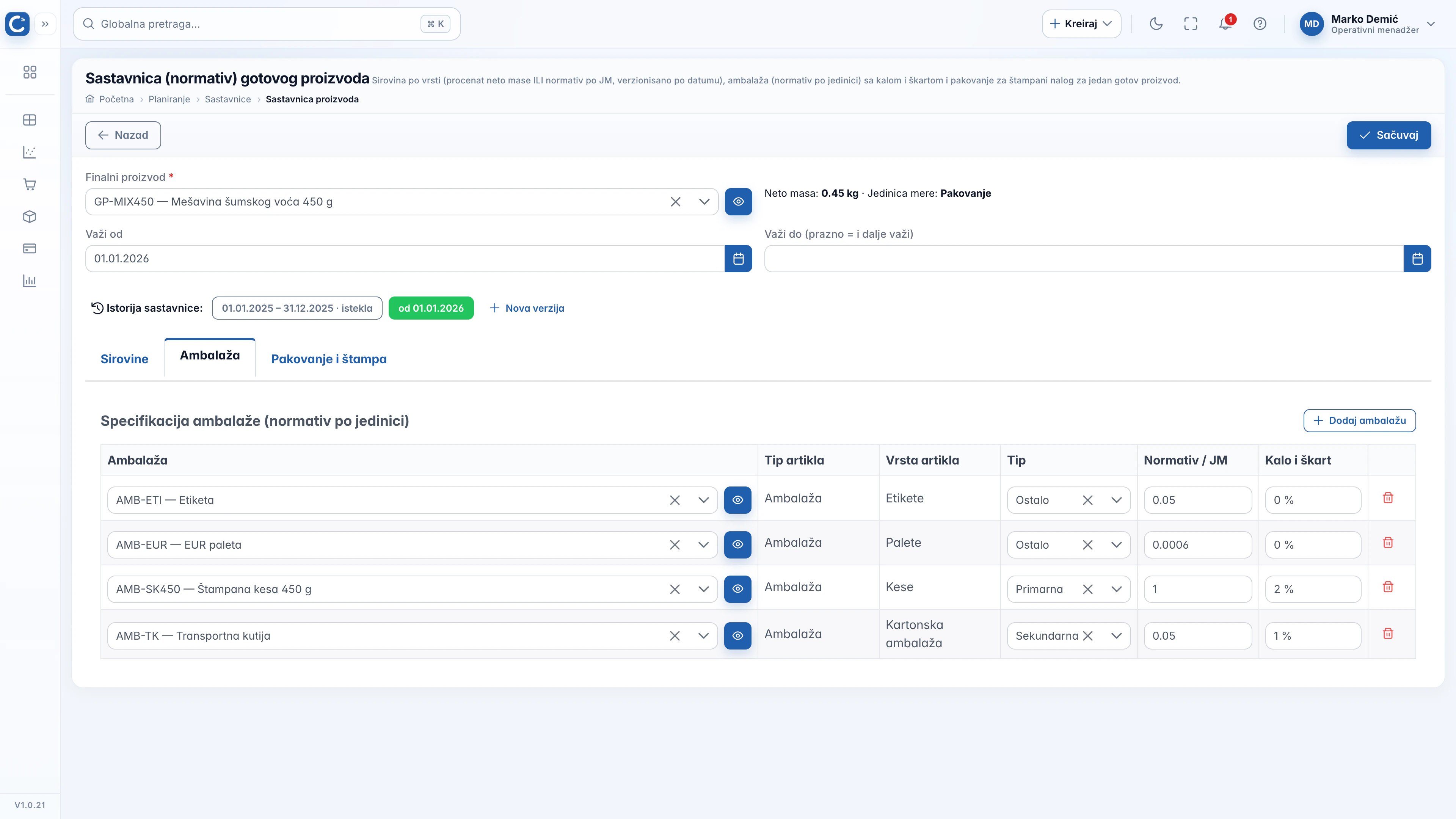
Bill of materials for a 450 g mixed berries product: net mass, version history and packaging specification — primary, secondary and other, with quantity per unit and loss
A bill of materials with versions and the packaging specification — the basis for material and production planning.Screenshot with fictional demo data. Click for full size.
Capabilities

What the bill of materials does for your production

The recipe is entered once and used by purchasing, planning, the shop floor and the warehouse — each at the moment they need it.

  • One recipe per finished product

    A product’s raw materials, packaging and packing data sit in one editor, on three tabs, and are saved together. Its net weight and unit of measure are shown right next to the product name.

  • Percentage of net weight or quantity per unit

    A raw material is entered as a share of the product’s net weight — the total must be exactly 100% — or as a quantity per unit, such as one sachet of flavouring per pack.

  • Raw materials by type, not by item code

    The recipe names a raw material type, so the same material from another supplier, grade or harvest year doesn’t need a new recipe. The planner picks the specific item code only when releasing the work order to the warehouse, based on available stock.

  • A waste allowance on every line

    Each line carries a waste percentage, so requirements are calculated on what is really consumed, not on an ideal quantity. Piece counts are rounded up to whole pieces.

  • Packaging alongside the recipe

    Boxes, film, cups and labels are entered as a quantity per unit of product — primary, secondary and other packaging, each with its own waste allowance. Packaging purchasing sees the requirement as soon as an order comes in.

  • Packing and print data

    Packs per carton, cartons per pallet, pallet pattern and stacking, labels, gross weight and shelf life, plus brand, specification number, ingredients and permanent pack text. From these, the production order works out cartons, pallets and gross weight on its own.

  • Versions with effective dates

    A recipe change is a new version with the date it takes effect, and the previous version closes automatically the day before. Every order uses the version valid on its date, and the system warns you about overlaps or gaps between versions.

  • The basis for material planning

    Raw material and packaging requirements are calculated from customer orders and the production plan through the bill of materials, waste included. Purchasing sees the shortfall by raw material type and by day, and turns it into purchase orders.

  • Planned consumption in one click

    On a production order, raw materials and packaging are filled in from the bill of materials, and the work order carries them to the warehouse as planned consumption. The warehouse knows exactly what to issue, and actual consumption is compared with the plan.

How it flows

From recipe to warehouse

The bill of materials starts the chain: every next step takes its quantities from it, instead of someone working them out by hand.

  1. 01

    The technologist enters the recipe

    Finished product, raw materials by type as a percentage or per unit, waste allowance, packaging and packing — with the date the recipe takes effect.

  2. 02

    An order creates demand

    For each product on a customer order, the bill of materials valid on the loading date is used, so you know how much raw material and packaging is needed, and by when.

  3. 03

    Purchasing places orders

    The shortfall by raw material type and packaging item, net of stock and goods on the way, becomes purchase orders to suppliers.

  4. 04

    Production order

    A production order is created from the customer order, and planned consumption is filled in from the bill of materials — with waste included and packaging rounded up to whole pieces.

  5. 05

    Release to the warehouse

    Each raw material type is resolved to a specific item code by available stock, and the work order goes to the warehouse with its planned consumption.

  6. 06

    Plan vs actual consumption

    The warehouse reports what was actually issued, so recipe consumption is compared with actuals — line by line and order by order.

Real-world scenario

What it looks like in a real plant

A situation every manufacturer knows — and how NG Operations runs it, step by step.

A new recipe from the first of the month

Illustrative example

The situation

A pâté producer is changing the recipe for its chicken pâté: from 1 March the share of chicken meat goes up from 30% to 35% of net weight, and the share of vegetable fat comes down. The plan has orders loading both at the end of February and in March, and purchasing needs to know how much meat to buy for which period.

The challenge

When recipes live in a spreadsheet, someone edits the old sheet and February’s orders get the new calculation. Purchasing buys to one version, the shop floor works to another, and later nobody can say for sure which recipe a batch was made to.

How it runs in NG Operations

  1. 1The technologist opens the bill of materials and creates a new version: the current recipe is copied, they change the percentages and set the new version to take effect on 1 March.
  2. 2On saving, the previous version closes automatically on 28 February, and the recipe can’t be saved until the percentages add up to exactly 100%.
  3. 3The recipe history shows the current and the upcoming version; had a gap or an overlap been left between them, the system would have flagged it immediately.
  4. 4Orders loading in February are calculated with the old version and March orders with the new one — material planning shows the higher chicken requirement for March straight away.
  5. 5Production orders use the version valid on their date, so the warehouse gets accurate planned consumption.
  6. 6The old version is never deleted: for a batch made in February, you always know which recipe it was made to.

Who does what

  • TechnologistIntroduces the new recipe version with its effective date.
  • PurchasingOrders meat and vegetable fat to the requirements under the old and the new recipe.
  • Production plannerCreates production orders that pick up the valid version by themselves.

What you gain

A recipe change is made once, in one place, and takes effect on an exact date. Purchasing, planning and the shop floor work to the same version, and the history is kept for quality control and complaints.

See how this process works in NG Operations

Illustrative example: the numbers are an example, the steps are the actual workflow in NG Operations.

From customer order to exact raw material and packaging quantities

Illustrative example

The situation

A spice producer receives an order for 20,000 sachets of a 100 g barbecue seasoning, loading in ten days. The recipe has four raw materials — sweet paprika, salt, garlic powder and black pepper — and the sachets also need boxes and labels.

The challenge

Without a bill of materials in the system, requirements are worked out by hand for every order: waste gets forgotten, an old recipe gets used, and sachets and boxes are ordered by gut feel — and arrive late just as the line is due to start.

How it runs in NG Operations

  1. 1The sales rep enters the order, and the bill of materials valid on the loading date is used for the product.
  2. 2The recipe is set as a percentage of net weight: paprika makes up 45% of the 2,000 kg of seasoning, so with a 3% waste allowance the requirement is 927 kg.
  3. 3Packaging is set per unit of product — one sachet per pack, and one box and one label for every 40 sachets — with the waste allowance the technologist entered; piece counts are rounded up.
  4. 4Material planning shows requirements by day, net of stock, goods on the way and open purchase orders: there isn’t enough black pepper, so purchasing turns the shortfall into a purchase order to the supplier.
  5. 5The planner creates the production order, and planned consumption is filled in from the bill of materials in one click, waste included.
  6. 6When releasing to the warehouse, the planner splits the paprika across two lots in stock — the system allocates them itself, starting with the largest stock — and the warehouse knows exactly what to issue.

Who does what

  • TechnologistMaintains the recipe, waste allowances and packaging quantities.
  • PurchasingOrders raw materials and packaging from the shortfall the bill of materials calculates.
  • Production plannerCreates the production order and releases the work order to the warehouse with specific item codes.

What you gain

There is no manual calculation between a customer order and exact raw material and packaging quantities: purchasing orders on time, the production order carries accurate planned consumption, and the warehouse issues what the recipe calls for.

See how this process works in NG Operations

Illustrative example: the numbers are an example, the steps are the actual workflow in NG Operations.

How the bill of materials works in practice

A few rules that keep the recipe, the order and the warehouse in step.

How a percentage becomes kilograms

Order quantity × net weight per unit × percentage, plus the waste allowance. For 1,000 packs of 0.75 kg and a raw material at 15%, that is 112.5 kg — and 115.875 kg with a 3% waste allowance.

The raw material type is resolved at release

When a work order is released to the warehouse, a specific item code is chosen for each raw material type — codes are listed by available stock, excluding blocked goods — and one type can be split across several lots. If a type has only one item code, it is selected automatically.

Orders keep their own copy of packing data

A production order keeps the packing data from the moment it was created, so a change to the product doesn’t alter an order already on the shop floor. When one customer order needs different packing, it is changed on that order only — and, if you choose, on the product for all future orders.

Frequently asked questions

What is a bill of materials?

A bill of materials (BOM) lists what a product is made of and how much of each component goes into one unit — in process industries it is often called a recipe or formula. In NG Operations, a finished product’s raw materials, packaging and packing data live in one place.

Can a recipe be set in percentages?

Yes. A raw material is entered as a percentage of the finished product’s net weight — the total must be 100% — or as a quantity per unit when the relationship isn’t by weight. Both kinds of lines can sit in the same recipe.

How is waste accounted for?

Each line has a waste percentage that increases the requirement — both in material planning and in planned consumption on the order. Packaging and other lines counted in pieces are rounded up to whole pieces.

What happens when we change a recipe?

You create a new version with the date it takes effect, and the previous one closes the day before. Orders use the version valid on their date, and the old version is kept — for quality checks, complaints and past orders.

Why does the recipe name a raw material type rather than an item code?

Because the same raw material often has several item codes — by supplier, origin, grade or harvest year. The recipe doesn’t change when the supplier does: the specific code is chosen when the work order is released to the warehouse, based on available stock, and can be split across several lots.

How does the bill of materials affect purchasing?

Raw material and packaging requirements are calculated from customer orders and the production plan through the bill of materials, waste included, and then netted against stock, goods on the way and open purchase orders. A wizard turns the shortfall into purchase orders, grouped by supplier and date.

What does the warehouse get from the bill of materials?

A work order with planned consumption of raw materials and packaging — with specific item codes, locations and quantities. The quantities actually issued come back to the order and are compared with the recipe plan.

Related

  • Purchasing7 min read

    Packaging planning in manufacturing: keeping boxes and labels from stopping the line

    When a line stops for lack of material, the culprit is often packaging: a box, a film or a label made for one customer. How to calculate packaging requirements per day from orders and bills of materials, how much minimum stock makes sense, and how to split packaging purchases across suppliers.

  • Manufacturing8 min read

    Bills of materials: the foundation of accurate product cost

    Product cost is only as accurate as the bills of materials and standard quantities behind it. On setting quantities as a share of net mass or per unit, loss and scrap allowances, the gap between standard and actual consumption, versions — and how a small error multiplies.

  • Production planning8 min read

    MRP vs MPS vs APS: what each one does and when you need it

    Three acronyms that software brochures use almost interchangeably, even though they solve three different problems. We explain the order, the inputs and outputs of each layer, and how to tell which one you are actually missing.

Want to see how this would look in your production?

In a free consultation and demo we walk through your sales plan, materials and production in NG Operations and show how the plan connects to the warehouse.