Skip to content
NG Operations
Sales planning

Sales planning: delivery dates that purchasing and production can actually meet.

In NG Operations the planning cycle starts with the customer: contracts, orders and loading dates are the demand from which purchasing calculates raw materials and packaging and production builds its plan. The loading plan shows how busy every day is, and the departments — raw material and packaging purchasing, production and sales — sign off a date before it is promised to the customer.

  • Contracts as demand
  • Loading plan
  • Department sign-offs
  • Drag-and-drop rescheduling

Free consultation and a demo on your own processes.

The NG Operations planning cycle: Sales plan → Materials and packaging → Purchasing → Production plan → Laboratory → Customer delivery. NG WMS — the warehouse executes the plan: what arrives from suppliers, what gets produced, what goes to customers; actuals flow back into the plan.

In the application

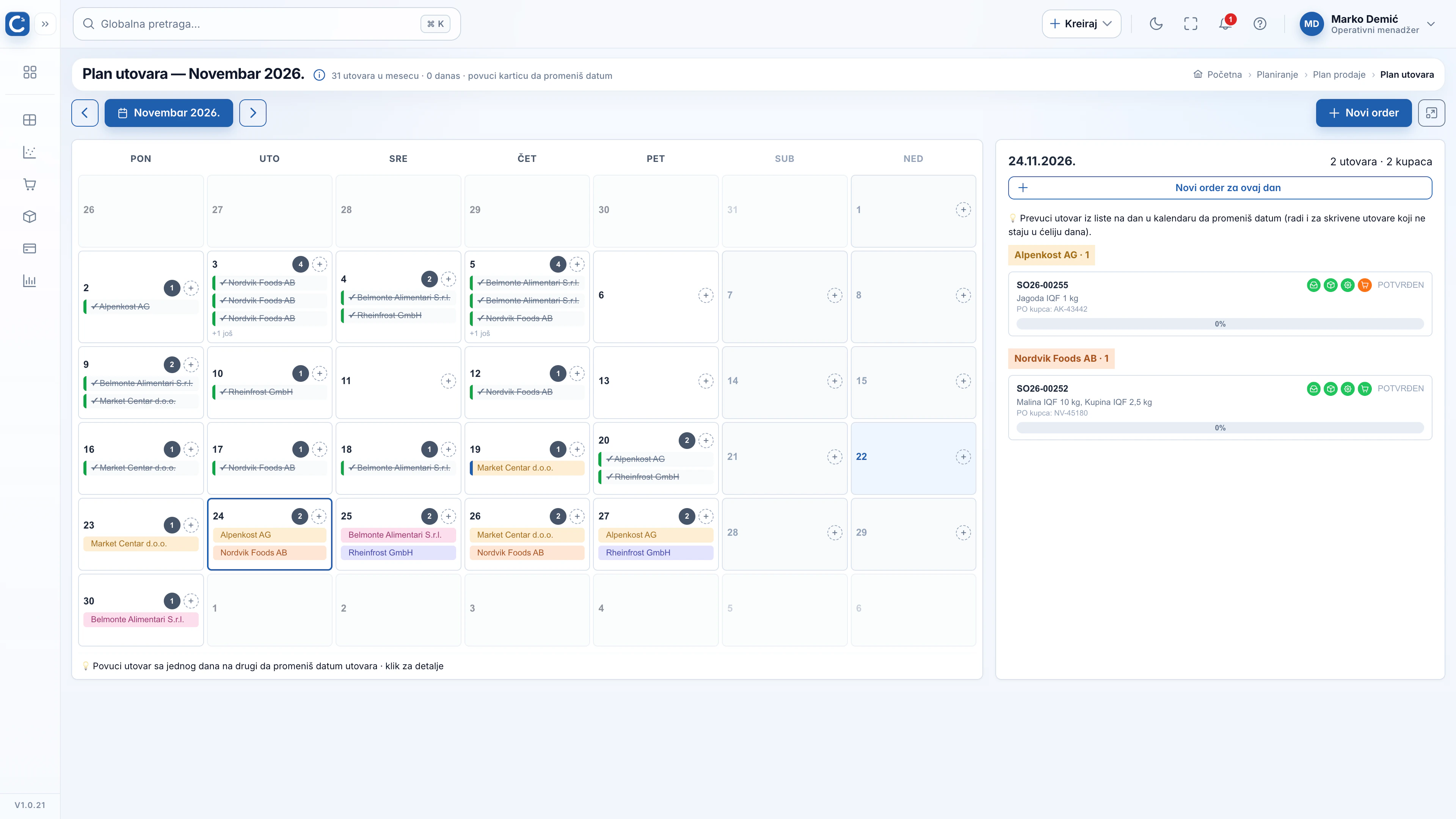
The monthly loading plan: loadings by day coloured per customer, shipped ones ticked, and for the selected day the orders with products, sector confirmations and delivery status
The loading plan: every day with its orders, purchasing, packaging, production and sales confirmations and delivery status.Screenshot with fictional demo data. Click for full size.
Capabilities

What sales planning gives you

Sales stops promising from memory, and purchasing and production are no longer the last to hear about an order: everyone works on the same orders and the same dates.

  • Contracts as long-term demand

    A framework contract with a customer carries the delivery period and, optionally, quantities. The part the customer has not yet ordered can go into the purchasing calculation as long-term demand, spread to the end of the contract — so raw materials and packaging are planned before the orders arrive.

  • Orders with a loading date

    A sales order carries the customer, items, quantities and loading date. That date puts it on the loading plan, purchasing adds up requirements by it, and production knows when the goods must be ready.

  • The loading plan on one screen

    A monthly calendar shows how many loadings fall on each day, order cards in the customer’s colour and a bar showing how much of each has already shipped. Before you offer a customer Thursday, you can see whether Thursday is already full.

  • Drag and drop — for many orders at once

    When a customer moves a loading, drag the card to the new day and the date is changed, without opening the order. When a whole series of deliveries moves, select the orders in the list and shift their loading date by the same number of days in one go.

  • Department sign-offs before the promise

    Raw material purchasing, packaging purchasing and production confirm that they can fulfil the order; production also records the date it can deliver by. Sales signs off last, once the customer accepts the agreed date — and who confirmed what, and when, stays on record.

  • Demand that drives purchasing and production

    Orders and bills of materials produce daily requirements for raw materials, consumables and packaging. The “From orders” wizard turns an order into a production order and work orders, with the production day proposed from the loading date.

  • Reserved only once confirmed

    An order confirmed by all three departments goes into reservations and is offered to the production planner. Meanwhile purchasing sees every order, so it can assess the requirement before it confirms.

  • Actuals come back on their own

    The warehouse (NG WMS) reports produced and shipped quantities: on every order, the P bar shows what has been produced and the O bar what has shipped. Nobody reports anything by hand.

  • Readiness by week

    The “Orders and loading” dashboard shows open orders by loading week, how ready they are — production order and department sign-offs — and the orders that are past their date.

How it flows

From contract to an agreed loading date

Every step works on the same order and the same date — no department waits for a spreadsheet or an email from another.

  1. 01

    Contract and order

    An order is created from a contract, by hand, by copying, straight from the loading plan or by Excel import — with the loading date the customer asked for.

  2. 02

    Materials

    Raw material and packaging purchasing see the new order’s requirements by day, check the shortfall and confirm their part.

  3. 03

    Production

    The planner turns the order into a production order and work orders, schedules them into shifts and confirms with the date production can finish by.

  4. 04

    Agreement with the customer

    Sales sees the requested date and the production date, agrees the loading with the customer and signs off last; the agreed date becomes the loading date.

  5. 05

    Loading plan

    Once released for dispatch, the order sits on the loading plan on the agreed day; any later change is a drag and drop.

  6. 06

    Actuals

    The warehouse reports what has been produced and shipped, and the loading plan shows how much of each loading has already gone.

Real-world scenario

What it looks like in a real plant

A situation every manufacturer knows — and how NG Operations runs it, step by step.

The customer wants loading in ten days

Illustrative example

The situation

A biscuit and wafer manufacturer receives an order from a retail chain: 18 pallets across six items, for loading in ten days. Two items go in new film printed for the customer, which is not in stock, and the wafer line is almost fully booked that week.

The challenge

When sales confirms a date on gut feeling, the problem surfaces too late: the film arrives after packing was planned, the line cannot finish in time, and the customer hears about yet another delay. Every department knows its own part, but nobody sees the whole picture before the promise is made.

How it runs in NG Operations

  1. 1The sales rep enters the order with the loading date the customer asked for; purchasing and the planner see the new demand immediately.
  2. 2On the raw material planning screen, raw material purchasing sees that flour, sugar and fats are covered by stock and purchase orders, and confirms its part.
  3. 3Packaging purchasing sees a shortfall of the new film, orders it from a supplier who delivers in eight days, and confirms.
  4. 4The production planner schedules the work orders and confirms with the date production can finish by — two days after the requested loading.
  5. 5Sales gets a proposed agreed date — the later production date — agrees it with the customer and signs off; it becomes the order’s loading date.
  6. 6Once released for dispatch, the order sits on the loading plan on the agreed day, and the order records who confirmed each part, and when.

Who does what

  • Sales repEnters the order, agrees the date with the customer and signs off last.
  • Raw material and packaging purchasingCheck the shortfall and confirm that materials will arrive on time.
  • Production plannerSchedules the orders and records when production can finish.

What you gain

The customer gets a date checked by everyone who has to deliver it, not a sales estimate. The film delay and the busy line show up before the promise, not on loading day — and it is clear who confirmed what.

See how this process works in NG Operations

Illustrative example: the numbers are an example, the steps are the actual workflow in NG Operations.

A retail chain moves its loadings by three days

Illustrative example

The situation

A dairy supplies yoghurt, cheese and kajmak to a retail chain. Because of a stock count at its distribution centre, the chain says that all nine loadings next week move by three days — except one, which it needs a day earlier.

The challenge

When dates are changed in a spreadsheet and by email, packaging purchasing keeps ordering for the old dates and production makes goods that sit waiting for the truck. For short shelf-life products, every day of waiting costs money.

How it runs in NG Operations

  1. 1In the order list, the sales rep filters by customer and loading period and selects all nine orders.
  2. 2With the bulk action “Shift loading date”, they move them by three days in one go.
  3. 3On the loading plan, the order the customer needs earlier is dragged to its new day — the date changes without opening the order.
  4. 4Raw material and packaging planning calculate requirements by the new dates, so the shortfall of cups and lids falls in the right week.
  5. 5The production planner sees the new loading dates and drags the work orders so the goods are made as close to loading as possible.
  6. 6The “Orders and loading” dashboard shows the orders by their new loading week and whether each has a production order and department sign-offs.

Who does what

  • Sales repShifts the dates for a whole series of orders and handles exceptions by drag and drop.
  • Packaging purchasingSees the shortfall by the new dates and moves supplier delivery dates.
  • Production plannerDrags work orders so the goods are fresh for the new loading.

What you gain

A change the customer reported once is visible everywhere straight away: on the loading plan, in material requirements and in the production plan. No ordering for old dates, and no goods ageing while they wait for the truck.

See how this process works in NG Operations

Illustrative example: the numbers are an example, the steps are the actual workflow in NG Operations.

An annual contract, monthly orders

Illustrative example

The situation

An animal feed plant has an annual contract with a large farm: 1,200 tonnes of finishing feed, which the farm orders every month. So far 400 tonnes have been ordered, and the maize and soybean meal for the rest of the year need to be contracted in good time.

The challenge

When all you see of a contract is what has already been ordered, purchasing buys raw materials order by order — often when they are most expensive or hard to get. The contract exists, but it plays no part in the plan.

How it runs in NG Operations

  1. 1Sales keeps the contract with its delivery period and contracted quantities; the farm’s monthly orders are created from the contract, so items are not typed again.
  2. 2Every order shows the contract balance — contracted, already ordered and available — with a warning if the farm asks for more than what is left.
  3. 3On the raw material planning screen, purchasing switches on the “Contracts” source: the 800 tonnes not yet ordered, converted through the BOM, are spread evenly to the end of the contract.
  4. 4A six-month view shows how much maize and soybean meal is needed month by month, so purchasing can contract with suppliers in advance.
  5. 5The sales contracts report compares contracted, ordered and delivered by month, and clicking a number opens the documents behind it.

Who does what

  • SalesManages the contract and orders and tracks how much the farm has drawn down.
  • PurchasingPlans raw materials for the rest of the contract and secures them in time.
  • ManagementSees contract fulfilment by month and what is still to be delivered.

What you gain

The contract is no longer paper in a drawer: its unordered part is part of the plan, raw materials for the rest of the year are bought in advance and in the right quantity, and contract fulfilment is visible by month — with no spreadsheets on the side.

See how this process works in NG Operations

Illustrative example: the numbers are an example, the steps are the actual workflow in NG Operations.

Sales and production plan in one system

Sales planning is where the cycle starts: what sales agrees, purchasing and production see at once, and what the warehouse does flows back into the plan.

Sales agrees

Contracts, orders and loading dates are the demand for the whole plant — no parallel spreadsheets or department-by-department estimates.

Purchasing and production plan

The same demand produces raw material, consumables and packaging requirements and a shift-by-shift production plan, and the date is confirmed before sales promises it.

The warehouse executes

NG WMS receives delivery notes and work orders and reports back what was produced and shipped. NG Operations also connects directly to your ERP — NG One, Pantheon, Microsoft Dynamics 365 Business Central, SAP and others.

Frequently asked questions

Where does NG Operations get its demand from?

Planning starts from what has been agreed with customers — contracts, orders and loading dates — rather than from an estimate. The part of a contract the customer has not yet ordered can be included as long-term demand, spread to the end of the contract — so purchasing also plans for what is still to come through orders.

Is this S&OP?

In practical terms, yes: sales and operations — raw material purchasing, packaging purchasing and production — work on the same orders and dates and agree the loading date before it is promised to the customer. NG Operations does not replace a formal S&OP process with forecasts and financial plans; it covers the operational part — everyone working to the same plan and the same dates.

How is a delivery date confirmed to the customer?

An order has four sign-offs. Raw material purchasing, packaging purchasing and production confirm they can fulfil it, and production also records the date it can deliver by. Sales signs off last: it sees what the customer asked for and when production can deliver, agrees the date with the customer and enters it — that date becomes the loading date. Every sign-off records who confirmed and when.

What happens when a customer moves a loading?

Drag the order card to the new day on the loading plan, or select several orders in the list and shift their date by the same number of days. Purchasing and production work to the new date straight away: material requirements are recalculated and the planner sees the new deadline for the work orders.

How do orders get into the system?

By hand, by copying an existing order, straight from the loading plan for a chosen day, or by importing an Excel (XLSX) file when customers send orders in a spreadsheet. If there is a contract, its items are carried over to the order, and every line shows how much of the contract is still available.

How does sales planning affect purchasing and production?

Every order is converted through the bill of materials into raw material, consumables and packaging requirements by loading day, so purchasing sees the shortfall and turns it into purchase orders. Production uses the “From orders” wizard to create a production order and work orders from the order, with the production day proposed from the loading date.

Can we see whether goods have been produced and shipped?

Yes. The warehouse — NG WMS or another connected WMS — reports produced and shipped quantities, so every order has produced and shipped bars, and the loading plan shows how much of each loading has already gone. There is no manual reporting.

Related

  • Production planning8 min read

    How to build a production plan: from customer order to a shift on the line

    A production plan answers one question: what gets made, on which line, on which day and in which shift, so the goods are ready for loading. Step by step, with an example: from demand and loading dates, through the bill of materials and material availability, to releasing work orders to the warehouse and comparing plan with actuals.

  • Sales planning6 min read

    Confirming delivery dates: how to promise customers a date you can keep

    Sales knows what the customer wants, but not whether the packaging will arrive or whether a line has a free shift. Why sales shouldn’t promise a loading date alone, what purchasing, packaging and production check first, and how department sign-offs and the loading plan keep the promise on paper and on the shop floor.

  • Sales planning7 min read

    Sales forecast accuracy: how to measure it and how to improve it

    “Our forecast is pretty good” is not a measurement. We explain how MAPE, WMAPE, bias and forecast value added measure accuracy, how to turn those measurements into a better next cycle — and what to do when the contract is the forecast.

Want to see how this would look in your production?

In a free consultation and demo we walk through your sales plan, materials and production in NG Operations and show how the plan connects to the warehouse.