Skip to content
NG Operations
Material planning (MRP)

MRP software for raw materials and packaging: order what’s short, on time.

NG Operations takes customer orders, the production plan and bills of materials, works out how much raw material, consumables and packaging you need each day, subtracts what you already have or have coming, and shows what is really short. The “Plan purchasing” wizard turns the shortfall into purchase orders by supplier, and the warehouse gets the receipt notice.

  • Daily shortfall
  • Raw materials and packaging
  • Purchase orders from the plan
  • Receipts sent to the WMS

Free consultation and a demo on your own processes.

The NG Operations planning cycle: Sales plan → Materials and packaging → Purchasing → Production plan → Laboratory → Customer delivery. NG WMS — the warehouse executes the plan: what arrives from suppliers, what gets produced, what goes to customers; actuals flow back into the plan.

In the application

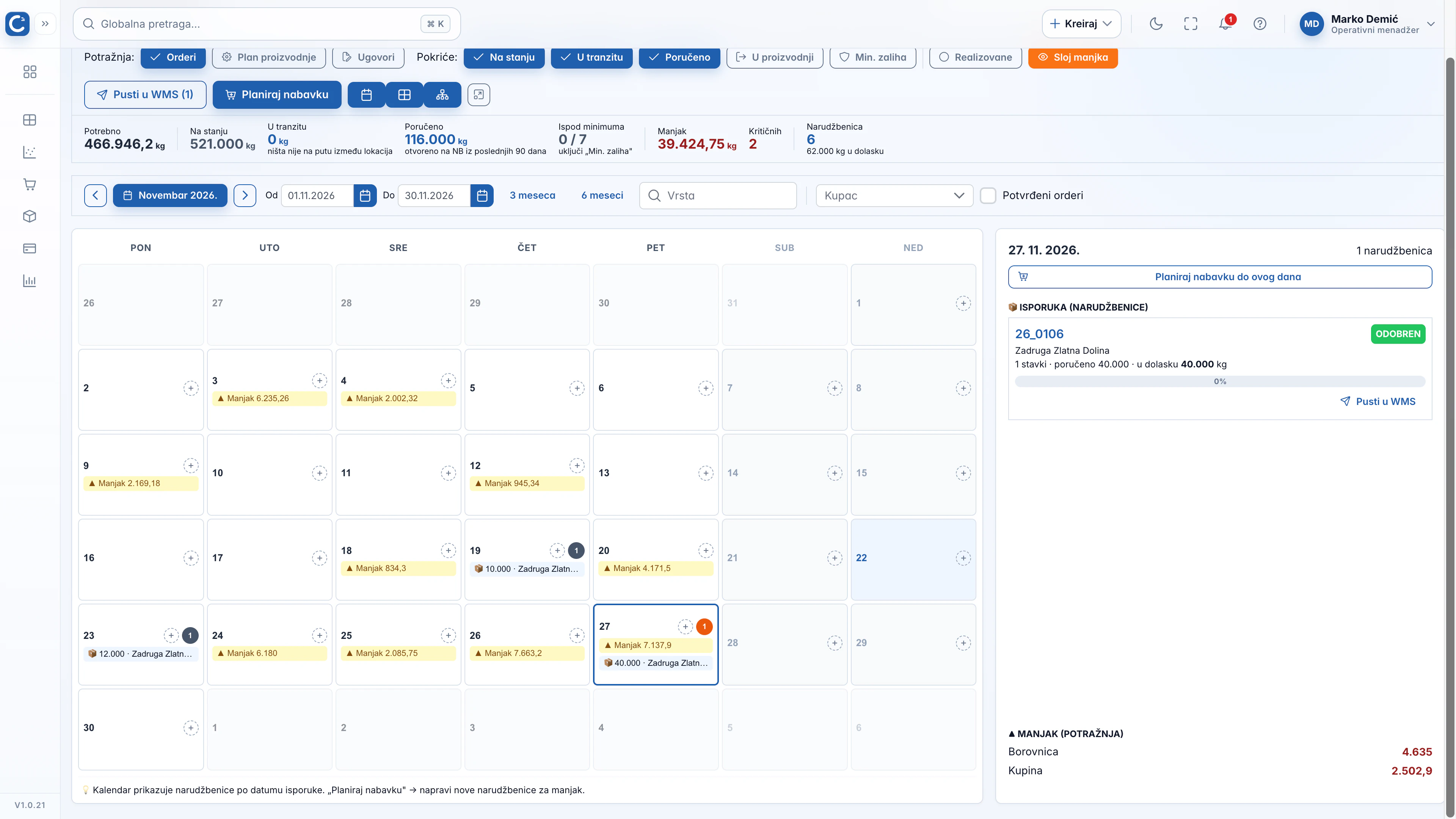
Raw material planning: required, in stock, on order and shortage, a calendar with daily shortages and incoming purchase orders, and for the selected day the purchase order and the shortage by material type
Raw material planning: shortage per day, incoming purchase orders and exactly what is missing — before the line stops.Screenshot with fictional demo data. Click for full size.
Capabilities

What purchasing gets from MRP planning

The order list is no longer built from memory and spreadsheets: requirements come straight from sales and production and change as soon as they do.

  • A shortfall that calculates itself

    For every day: demand from orders and the production plan, converted through the bill of materials and increased by the waste allowance, minus stock, goods in transit between your sites, open purchase orders and material already issued to production — plus the minimum stock you want to keep.

  • Raw materials by type

    The BOM asks for a raw material type, not a single item code. Requirements and stock are shown per type, across all its codes, and purchasing picks the exact code and supplier only when it orders.

  • Packaging by exact item

    Packaging is planned by the item code in the finished product’s packaging specification — cartons, film, labels, pallets — with a quantity per unit and a waste allowance. The table also shows how many finished packs current stock will cover.

  • Calendar of deliveries and shortfalls

    Purchase orders by delivery date and shortfalls by day sit on the same calendar. The table for the whole period lists items from the largest shortfall down — that is your ordering priority.

  • From shortfall to purchase order

    The “Plan purchasing” wizard proposes quantities; you choose the item, the supplier and the delivery date. Lines are grouped into purchase orders by supplier and date, and one item can be split across several suppliers.

  • Long-term demand from contracts

    The part of sales contracts that customers have not yet ordered can be included, spread to the end of each contract. A three- or six-month view shows what needs to be agreed with suppliers in good time.

  • Customer-printed packaging — no more than contracts need

    For primary packaging, the system calculates how much may still be bought under active sales contracts and warns when a purchase order goes beyond it. You are not left with film printed for a customer that nobody needs once the contract ends.

  • Stock projection on the item card

    The item card brings together stock, purchase orders, sales orders and planned production, and shows when the item will run out based on current documents — the date of the first shortfall and how deep it goes.

  • Receipt notices for the warehouse

    “Release to WMS” turns a purchase order into a receipt notice for the warehouse — for raw material or packaging. When the warehouse receives the goods, stock goes up, the open quantity goes down and the shortfall recalculates itself.

How it flows

From customer order to raw material in stock

Material planning is the second step of the cycle: it starts from what has been sold and planned and ends with goods in the warehouse.

  1. 01

    Demand

    Customer orders by loading date, open production orders by production day and, if you choose, the unordered part of sales contracts.

  2. 02

    Bill of materials

    Each product is converted into raw materials and packaging using the BOM valid on the loading date, with the waste allowance.

  3. 03

    Coverage

    Stock, goods in transit, open purchase orders and material already issued to production are subtracted; minimum stock can be added.

  4. 04

    Daily shortfall

    The calendar and the table show what is short, on which day and by how much — largest shortfall first.

  5. 05

    Purchase orders

    The “Plan purchasing” wizard creates purchase orders by supplier and delivery date; they can be approved straight away.

  6. 06

    Goods receipt

    The receipt notice goes to the warehouse, and received quantities flow back into the plan and close the shortfall.

Real-world scenario

What it looks like in a real plant

A situation every manufacturer knows — and how NG Operations runs it, step by step.

An export order for next week — is there enough packaging?

Illustrative example

The situation

A tea factory receives an order under an annual contract for a foreign retail chain’s private label: 60,000 boxes of tea in three flavours, loading next Friday. The boxes printed for the customer, the shipping cartons and the labels are partly in stock and partly already on order.

The challenge

When packaging is calculated in a spreadsheet, it is easy to miss what is already on order or sitting at the other site. You either order too many customer-printed boxes, which nobody needs once the contract ends — or too few, and packing stops the day before loading.

How it runs in NG Operations

  1. 1Packaging purchasing opens packaging planning and selects the customer; the new order is already in demand, on its loading day.
  2. 2For every item the system has calculated the requirement — number of packs × quantity per unit from the packaging specification, plus waste — and subtracted stock, goods in transit from the other site and open purchase orders.
  3. 3There is a shortfall of boxes for two flavours and of shipping cartons. The “Under contracts” column shows how many customer-printed boxes may still be bought under the active contract, so nothing is ordered beyond that.
  4. 4In the day panel, “Plan purchasing up to this day” opens the wizard with only the requirements up to loading, with the supplier from the packaging specification.
  5. 5The cartons are split between two suppliers — part from the usual one, the rest from a second who can deliver sooner — and three purchase orders are created, grouped by supplier and delivery date.
  6. 6“Release to WMS” sends the receipt notices to the warehouse; when the goods arrive, the shortfall closes by itself.

Who does what

  • Packaging purchasingChecks the shortfall, creates purchase orders from the wizard and confirms its part on the order.
  • WarehouseReceives packaging against receipt notices from NG Operations.
  • Production plannerPlans packing knowing when the packaging arrives.

What you gain

Packaging for the export order is ordered the same day, in a quantity that covers the loading — with no surplus of customer-printed boxes. The warehouse knows what is coming and when, and packing does not wait for cartons.

See how this process works in NG Operations

Illustrative example: the numbers are an example, the steps are the actual workflow in NG Operations.

A pigment with a six-week lead time

Illustrative example

The situation

A paint and varnish factory imports titanium dioxide; about six weeks pass between ordering and receipt. Sales has annual contracts with two distributors, and the decorating season starts in two months.

The challenge

When purchasing works only from orders that have already arrived, it is always too late for a raw material with a long lead time. And when you order “just in case”, money sits in the warehouse.

How it runs in NG Operations

  1. 1On the raw material planning screen, purchasing selects the six-month view and switches on the “Contracts” source: the unordered part of both contracts, converted through the BOMs, is spread to the end of each contract.
  2. 2Titanium dioxide is planned by type: stock is added up across both item codes the factory uses, and the shortfall is shown month by month.
  3. 3The item card for the main code shows the projection: based on current sales and purchase orders, stock runs out in the middle of next month.
  4. 4In the “Plan purchasing” wizard the requirement is split: the larger part from the import supplier, delivering in six weeks, and a smaller part from a local distributor to bridge the gap until then.
  5. 5Two purchase orders with different delivery dates are created and land on the plan calendar; until the goods arrive, their open quantity covers the shortfall.
  6. 6Once the shipment is certain, “Release to WMS” announces the receipt to the warehouse, and the received quantity flows back into the plan.

Who does what

  • Raw material purchasingPlans imports against contracts and splits the requirement between two suppliers.
  • SalesManages the contracts whose unordered part feeds long-term demand.
  • Purchasing managerTracks suppliers and delivery dates on the supplier card and the “Suppliers and delivery dates” dashboard.

What you gain

A raw material with a long lead time is ordered against what has been contracted, not when it is already too late. Bridging with a local supplier is planned rather than a rush, and nobody buys stock “just in case”.

Solutions in this scenario

See how this process works in NG Operations

Illustrative example: the numbers are an example, the steps are the actual workflow in NG Operations.

A juice plant plans a week ahead

Illustrative example

The situation

A juice plant fills juices into 0.5 l and 1.5 l PET bottles on two lines. The planner has built next week’s production plan — 22 work orders — which need concentrates, sugar, preforms, caps, labels and shrink film from several suppliers.

The challenge

When purchasing checks every item separately, it is easy to miss that some caps have already been issued to the lines, or that the labels will last only until Wednesday. The line then stops over a small item, and in season a lost shift is hard to make up.

How it runs in NG Operations

  1. 1Purchasing switches on the “Production plan” source: demand comes from production orders by production day, and orders that already have a production order are not counted twice.
  2. 2It also switches on “In production” — sugar and caps already issued to the lines for those orders are not requested again — and “Min. stock”, because the plant keeps a minimum of labels and caps.
  3. 3The “Plan purchasing” wizard lists 14 items with a shortfall; under each one, a small legend shows where it comes from — required, stock, on order, issued and minimum.
  4. 4“Supplier for all” and “Delivery date for all” fill most rows, and the rest are adjusted by hand.
  5. 5A preview before creation shows every purchase order to be created; five purchase orders are created, approved straight away.
  6. 6A bulk “Release to WMS” creates the receipt notices for the warehouse; every receipt flows back into the plan and the shortfall is recalculated.

Who does what

  • Production plannerBuilds the weekly plan that drives material demand.
  • PurchasingTurns the shortfall into purchase orders by supplier in a single pass.
  • WarehouseReceives goods against the announced receipt notices in NG WMS.

What you gain

Materials for a week of production are ordered in one pass, by supplier and date — including the small items that most often stop a line. What is already on the lines is not ordered again, and the minimum stays in stock.

See how this process works in NG Operations

Illustrative example: the numbers are an example, the steps are the actual workflow in NG Operations.

Plan, purchasing and warehouse on the same numbers

MRP in NG Operations is not a weekly report: it changes with every order, production order and receipt.

Sales and production create demand

Orders, contracts and the production plan are the only sources of demand — purchasing does not copy requirements from other people’s spreadsheets.

Purchasing orders

A shortfall becomes a purchase order in a few steps, by supplier and date, and the purchase order lands on the plan calendar.

The warehouse receives, the plan updates

NG WMS (or another connected WMS) receives goods against the notice and reports back received quantities, stock and goods in transit. Your ERP — NG One, Pantheon, Microsoft Dynamics 365 Business Central, SAP or another — connects directly.

Frequently asked questions

What is MRP, and how does NG Operations do it?

MRP (material requirements planning) calculates the materials you need: how much of what, when, and how much of it is short. NG Operations works it out from customer orders, the production plan and, if you choose, sales contracts, through bills of materials, and shows the daily shortfall for raw materials, consumables and packaging.

How is the shortfall calculated?

For each day: demand converted through the bill of materials and increased by the waste allowance, minus stock on hand, goods in transit between your sites, open purchase orders and material already issued to production for those orders — plus minimum stock if you want to keep it. The shortfall is never below zero, and each part of the calculation can be switched on or off.

Are packaging and consumables planned too?

Yes. Packaging has its own screen, packaging planning, and is planned by the exact item code from the finished product’s packaging specification — cartons, film, labels, pallets. Raw materials and consumables from the BOM are planned by type on the raw material planning screen.

Can one item be ordered from several suppliers?

Yes. In the “Plan purchasing” wizard an item can be split into parts, each with its own item code, quantity, supplier and delivery date. Purchase orders are grouped by supplier and date, so a split item ends up on two purchase orders, and the “Remaining” field shows whether the shortfall is covered.

How does the warehouse know what is coming from suppliers?

A purchase order becomes a receipt notice for the warehouse in one click — a supplier receipt for raw material or a packaging receipt — with lines, facility and a link to the purchase order. When the warehouse receives the goods, received quantities flow back to the purchase order, stock goes up and the shortfall recalculates itself.

How can I see when an item will run out?

The item card shows the projection: it starts from today’s stock, adds purchase orders and planned production, subtracts sales orders and consumption in production, and shows the date of the first shortfall. The “Production plan (operations)” dashboard picks out packaging at risk of running short in the next three days and later in the week, with a list of what to order now.

Does the calculation see goods moving between our sites?

Yes. Goods shipped between your sites that have not yet been received at the destination are counted as goods in transit: they are not in stock at either warehouse, but they are yours and count as coverage.

Related

  • Production planning8 min read

    How to build a production plan: from customer order to a shift on the line

    A production plan answers one question: what gets made, on which line, on which day and in which shift, so the goods are ready for loading. Step by step, with an example: from demand and loading dates, through the bill of materials and material availability, to releasing work orders to the warehouse and comparing plan with actuals.

  • Purchasing7 min read

    Packaging planning in manufacturing: keeping boxes and labels from stopping the line

    When a line stops for lack of material, the culprit is often packaging: a box, a film or a label made for one customer. How to calculate packaging requirements per day from orders and bills of materials, how much minimum stock makes sense, and how to split packaging purchases across suppliers.

  • Purchasing8 min read

    From MRP proposal to purchase order: pegging, quantities and approval

    An MRP run ends with a proposal, not a purchase order. We explain the four checks in between — cause, quantity, timing and approval — and what happens to the purchase order after it is confirmed, right through to goods receipt.

Want to see how this would look in your production?

In a free consultation and demo we walk through your sales plan, materials and production in NG Operations and show how the plan connects to the warehouse.