Skip to content
NG Operations
Purchasing

Purchasing software for manufacturing: plan-driven purchase orders, receipts announced to the warehouse.

NG Operations turns raw material, consumables and packaging shortages from the plan into supplier purchase orders — grouped by supplier and delivery date, and against a contract where you have one. A confirmed purchase order becomes a receipt notice in the warehouse, and received quantities flow back into the plan, so purchasing always knows what is on order, what has arrived and what is still missing.

  • POs from the plan
  • Purchase contracts
  • Receipts announced to the warehouse
  • Supplier card

Free consultation and a demo on your own processes.

The NG Operations planning cycle: Sales plan → Materials and packaging → Purchasing → Production plan → Laboratory → Customer delivery. NG WMS — the warehouse executes the plan: what arrives from suppliers, what gets produced, what goes to customers; actuals flow back into the plan.

In the application

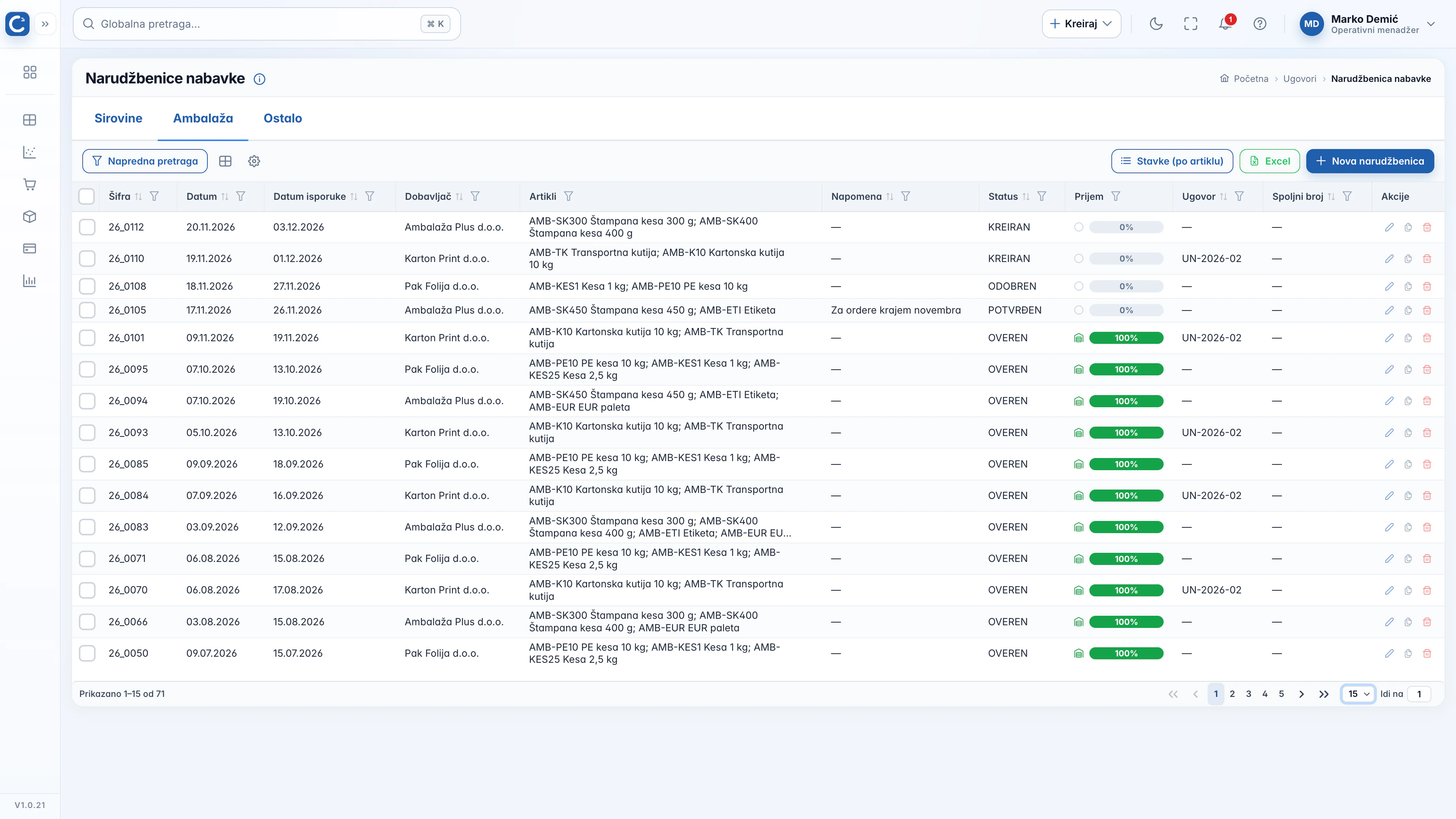
Packaging purchase orders: suppliers, items, statuses from created to approved, receipt progress and the link to the contract
Packaging purchase orders with status, warehouse receipt progress and the link to the contract.Screenshot with fictional demo data. Click for full size.
Capabilities

What NG Operations does in purchasing

From a shortage in the plan to goods in stock: contract, purchase order, receipt and actuals are linked, so nothing is retyped and nothing is ordered twice.

  • Purchase orders from the material plan

    The purchase planning wizard turns raw material and packaging shortages into purchase orders, grouped by supplier and delivery date. You choose the item and the supplier, and you can split one item across several suppliers.

  • Purchase contracts

    Terms, prices, currency, Incoterms and delivery period — with or without quantities. Text terms can carry an English version for foreign suppliers, and you can order against one contract as many times as you need.

  • Contract balance on the purchase order

    A purchase order linked to a contract takes over its items and prices and shows, for every line, how much is still available under the contract. Order more than what is left and the warning is impossible to miss.

  • Approve, send, confirm

    A purchase order is approved, sent to the supplier as PDF or DOCX, and becomes a receipt notice once it is confirmed. User roles and permissions decide who may approve, confirm or print.

  • Receipts announced to the warehouse

    The purchase order creates a receipt in NG WMS — a raw material or packaging receipt, with items, quantities, the facility and the PO number. For several purchase orders at once, a single release to WMS does it.

  • Deliveries in instalments

    One purchase order can have several receipts, each for the open quantity, so the same delivery is never announced twice. Each receipt carries the PO number, and later ones add a suffix — /1, /2.

  • Received quantities flow back to the plan

    What the warehouse actually received comes back to the purchase order: a received-quantity bar and an ordered-versus-received comparison per line. The open quantity goes down on its own and the shortage is recalculated.

  • Goods on the way count in the plan

    Open purchase orders and goods moving between your own sites count against the shortage, so nobody orders what is already on its way.

  • Supplier card and contract pivots

    Contracted, ordered and received by supplier and item, with a fulfilment percentage, down to the individual document. The purchase contract pivot report can be rearranged as needed and exported to Excel.

How it flows

From a shortage in the plan to goods in stock

Purchasing works on the same data as sales, production and the warehouse: every step picks up where the previous one left off.

  1. 01

    Demand from the plan

    Customer orders and the production plan, through the bills of materials, produce raw material and packaging demand per day — nobody keys it in.

  2. 02

    Shortage

    Stock, goods in transit, open purchase orders and material already issued to production are deducted from demand. What remains is what is really missing.

  3. 03

    Purchase orders

    The purchase planning wizard creates purchase orders by supplier and delivery date; where needed, they are linked to a contract.

  4. 04

    Approve and send

    The purchase order is approved and sent to the supplier as PDF or DOCX. If the supplier moves the date, the delivery date can be changed even after approval.

  5. 05

    Notice to the warehouse

    Confirming the purchase order — or a single release to WMS for several — creates a receipt in NG WMS, with the facility the goods are going to.

  6. 06

    Receipt and actuals

    The warehouse receives against the notice, received quantities flow back to the purchase order, and the shortage is recalculated automatically.

Real-world scenario

What it looks like in a real plant

A situation every manufacturer knows — and how NG Operations runs it, step by step.

From shortage to purchase orders in one morning

Illustrative example

The situation

A juice and nectar producer fills PET bottles from 0.33 to 1.5 litres. It has 38 customer orders for the next two weeks, and the plan shows shortages for six items: apple concentrate, sugar, PET preforms for the 1-litre bottle, caps, labels and shrink film.

The challenge

When the shortage is worked out in a spreadsheet, purchasing adds up orders, stock and open orders from several sources, and the warehouse finds out about the goods when the truck arrives. It is easy to order the same thing twice — or not at all, because someone assumed an old purchase order was still on its way.

How it runs in NG Operations

  1. 1The buyer opens raw material and packaging planning: the shortage per day is already calculated from orders, bills of materials, stock, goods in transit and open purchase orders.
  2. 2In the purchase planning wizard, the buyer picks the item and supplier for each line and splits the preforms between two suppliers — 60,000 pieces from one, 40,000 from the other.
  3. 3The wizard groups the lines into purchase orders by supplier and delivery date; the buyer approves them and sends them to the suppliers as PDF.
  4. 4When a supplier reports that the goods are on their way, a release to WMS creates the receipts: in NG WMS the warehouse sees what is coming, to which facility and against which purchase order.
  5. 5The labels arrive in two deliveries. The warehouse receives the first one, the received quantity flows back to the purchase order, and the rest stays open and still counts as goods on the way.
  6. 6The plan recalculates on its own: received goods move from “on order” to “in stock”, and the shortage shows only what nobody has ordered yet.

Who does what

  • BuyerCreates, approves and sends purchase orders from the plan.
  • Warehouse managerReceives against the notice in NG WMS, without retyping purchase orders.
  • Production plannerSees when material arrives and schedules accordingly.

What you gain

Purchasing orders exactly what is missing, for the day it is needed, the warehouse knows in advance what is coming, and received quantities flow back into the plan without retyping — no duplicate orders and no surprises at the dock.

See how this process works in NG Operations

Illustrative example: the numbers are an example, the steps are the actual workflow in NG Operations.

An annual granulate contract, delivered in instalments

Illustrative example

The situation

A plastic packaging manufacturer — buckets and lids — contracts polypropylene granulate from a foreign supplier for the whole year: 600 tonnes, with price, Incoterms and payment terms. The material is called off every month, in 24-tonne truckloads.

The challenge

When the contract lives in a file and the purchase orders in e-mails, nobody knows exactly how much of the contracted quantity has been ordered and received. Orders go over the contract or too late, and a supplier falling behind only becomes visible when the line runs short of granulate.

How it runs in NG Operations

  1. 1Purchasing enters the purchase contract: supplier, purchase type, delivery period, currency and Incoterms, with the text terms in English as well, because the contract goes to a foreign supplier.
  2. 2Once the contract is approved and confirmed, every monthly purchase order is linked to it: items and prices are taken over, and each line shows how much is still available under the contract.
  3. 3When the buyer orders more than the remaining quantity, the purchase order flags it with a warning — and the decision stays with the buyer.
  4. 4Confirming the purchase order sends the warehouse a receipt notice; each truck goes on its own receipt, which carries the PO number, with later ones adding /1, /2.
  5. 5The purchase contract pivot report shows contracted, ordered and received quantities by month, and clicking a number opens the documents behind it.
  6. 6The supplier card shows the fulfilment percentage: when received falls behind ordered, it shows while there is still time to act.

Who does what

  • Head of purchasingNegotiates the terms and follows contract fulfilment.
  • BuyerOrders the monthly quantities against the contract.
  • ManagementSees contracted, ordered and received without a custom report.

What you gain

Contract, purchase orders and receipts are linked: at any moment you know how much of the contract has been ordered, how much received and how much is left, and a supplier falling behind is spotted in time — not when the line stops.

See how this process works in NG Operations

Illustrative example: the numbers are an example, the steps are the actual workflow in NG Operations.

Purchasing, warehouse and plan — one picture

NG Operations announces, the warehouse receives, and the actuals flow back into the plan.

NG Operations announces

The warehouse knows in advance which goods are coming, from which supplier, to which facility and against which purchase order — and whether it is raw material or packaging.

The warehouse receives

Goods are received against the notice in NG WMS, or in another WMS connected to NG Operations. The supplier, the supplier’s document number and transport details are carried over from the purchase order.

Actuals flow back to the plan

Received quantities reduce the open purchase order, stock goes up and the purchasing plan is recalculated — without closing purchase orders by hand.

Frequently asked questions

Does NG Operations create purchase orders on its own?

Not without you. The purchase planning wizard turns the shortage in the plan into proposed purchase orders, grouped by supplier and delivery date. You choose the item and supplier and check quantities and dates, and the purchase orders are created when you confirm — already approved, if you wish.

How does the warehouse know what is coming?

When you confirm a purchase order, a receipt is created — a receipt notice in NG WMS, with the items, quantities, the facility the goods are going to and the PO number. For several purchase orders at once, release them to WMS in one step from the purchasing plan. The warehouse receives against the notice, and received quantities flow back to the purchase order.

What if goods arrive in several deliveries?

One purchase order can have several receipts. Each is created for the open quantity — ordered minus what is already on receipts — so the same delivery is never announced twice. Receipts carry the PO number, with later ones adding a suffix (/1, /2), and the purchase order shows how much has been received and how much is still open.

Can we order against an annual contract with a supplier?

Yes. A purchase contract carries terms and prices, with or without quantities. A purchase order linked to the contract takes over items and prices and shows how much is still available, and the purchase contract pivot report compares contracted, ordered and received quantities.

How do we see which supplier is late?

The item-level view flags late lines, the supplier card compares contracted, ordered and received with a fulfilment percentage, and the suppliers and lead times dashboard shows on-time-in-full deliveries, delays and lines still open after the due date.

Do goods on the way count in the plan?

Yes. Open purchase orders count as on order, and goods moving between your own sites as goods in transit. When the warehouse receives the goods, the same quantity moves into stock and the shortage is recalculated automatically.

Does purchasing work with our ERP and WMS?

Yes. NG Operations connects natively to NG WMS and can also be connected to another WMS. It connects directly to your ERP — NG One, Pantheon, Microsoft Dynamics 365 Business Central, SAP and others.

Related

  • Purchasing7 min read

    Packaging planning in manufacturing: keeping boxes and labels from stopping the line

    When a line stops for lack of material, the culprit is often packaging: a box, a film or a label made for one customer. How to calculate packaging requirements per day from orders and bills of materials, how much minimum stock makes sense, and how to split packaging purchases across suppliers.

  • Purchasing8 min read

    From MRP proposal to purchase order: pegging, quantities and approval

    An MRP run ends with a proposal, not a purchase order. We explain the four checks in between — cause, quantity, timing and approval — and what happens to the purchase order after it is confirmed, right through to goods receipt.

  • Purchasing8 min read

    How to reduce inventory without stopping production

    Cutting stock evenly across the whole range is the fastest way to run out of the right material while the wrong material keeps sitting in the warehouse. We explain segmentation, safety stock and the levers that free up capital without risking a stoppage.

Want to see how this would look in your production?

In a free consultation and demo we walk through your sales plan, materials and production in NG Operations and show how the plan connects to the warehouse.