Production planning software — The brain of your production.
NG Operations connects the sales plan, raw material, consumables and packaging needs, purchasing, the production plan and the lab in one cycle. Through the plan it tells the warehouse what arrives from suppliers, what gets produced and what goes to customers — and actuals flow back into the plan, with no retyping.
Free consultation and a demo on your own processes.
AI in planning:NG Copilot·MCP server- Cloud or on-premise
- Natively connected to NG WMS
- Works with your ERP
- Rollout and support from our team
NG WMS
the warehouse executes the plan
From the sales plan to delivery — one cycle, one system
Every step uses the same data as the one before: demand from the sales plan becomes material needs, needs become purchase orders, and the production plan follows the loading date. The lab closes the cycle before goods go to the customer.
- 01
Sales plan
Contracts, orders and loading dates on a calendar. Before a date is promised to the customer, purchasing, packaging, production and sales confirm it.
- 02
Raw materials, consumables and packaging
From the plan and the bills of materials, the system calculates the shortage for every day — taking stock, goods in transit, open purchase orders, waste and minimum stock into account.
- 03
Purchasing
One wizard turns the shortage into purchase orders by supplier and date, and the warehouse is told what is coming.
- 04
Production plan
Orders by line, day and shift, with an automatic plan proposal fine-tuned by drag and drop. Work orders go to the warehouse in one click.
- 05
Laboratory
Every lot is analysed against the customer’s specification, approved and certified (CoA) in English — quality is confirmed before loading.
- 06
Customer delivery
The loading plan becomes a delivery note in the warehouse, and shipped quantities flow back to the order and the plan.
This is what NG Operations looks like
Real screens from the application with demo data: the plan by line and shift, the loading plan, material needs and the laboratory.
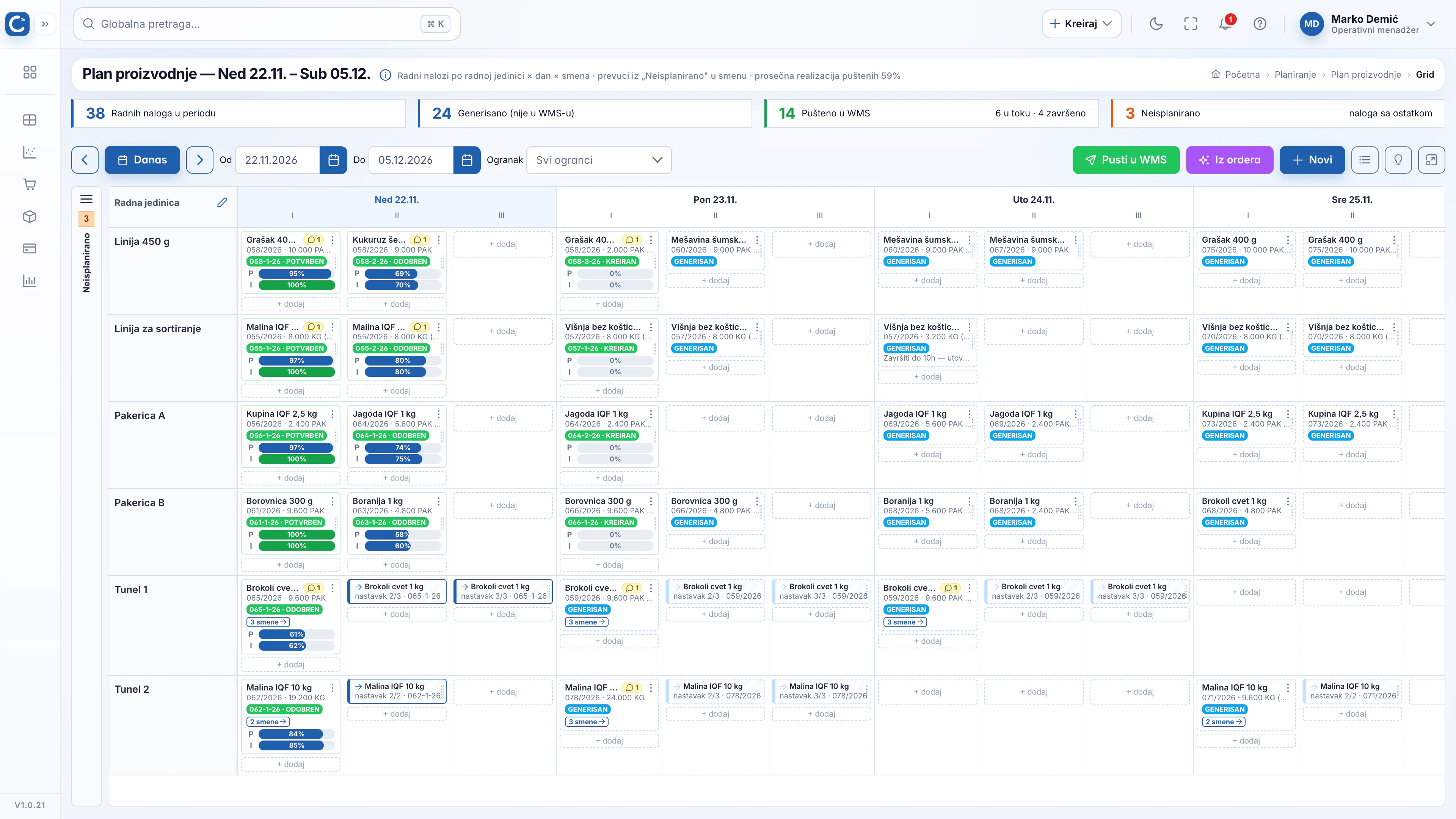
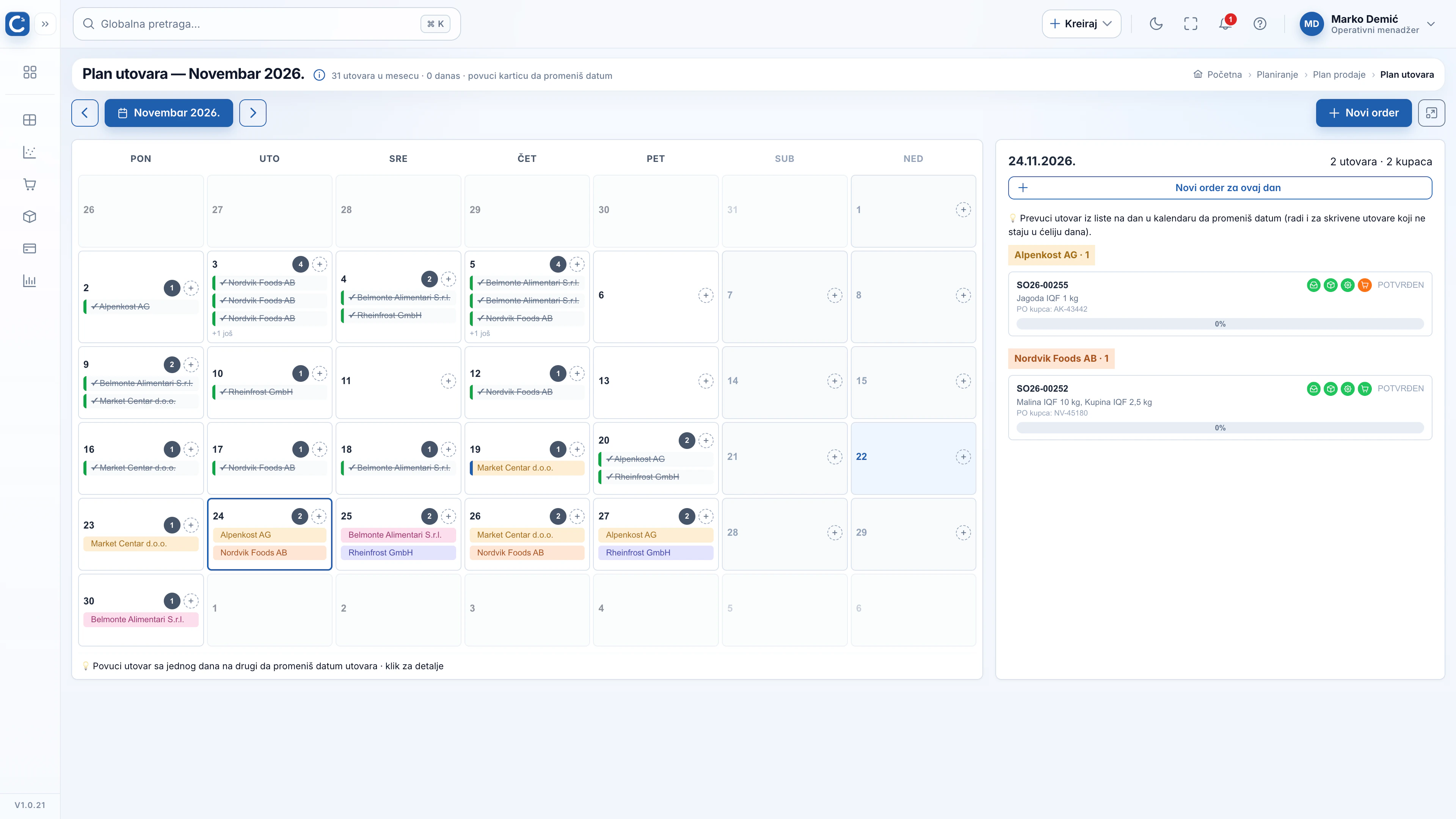
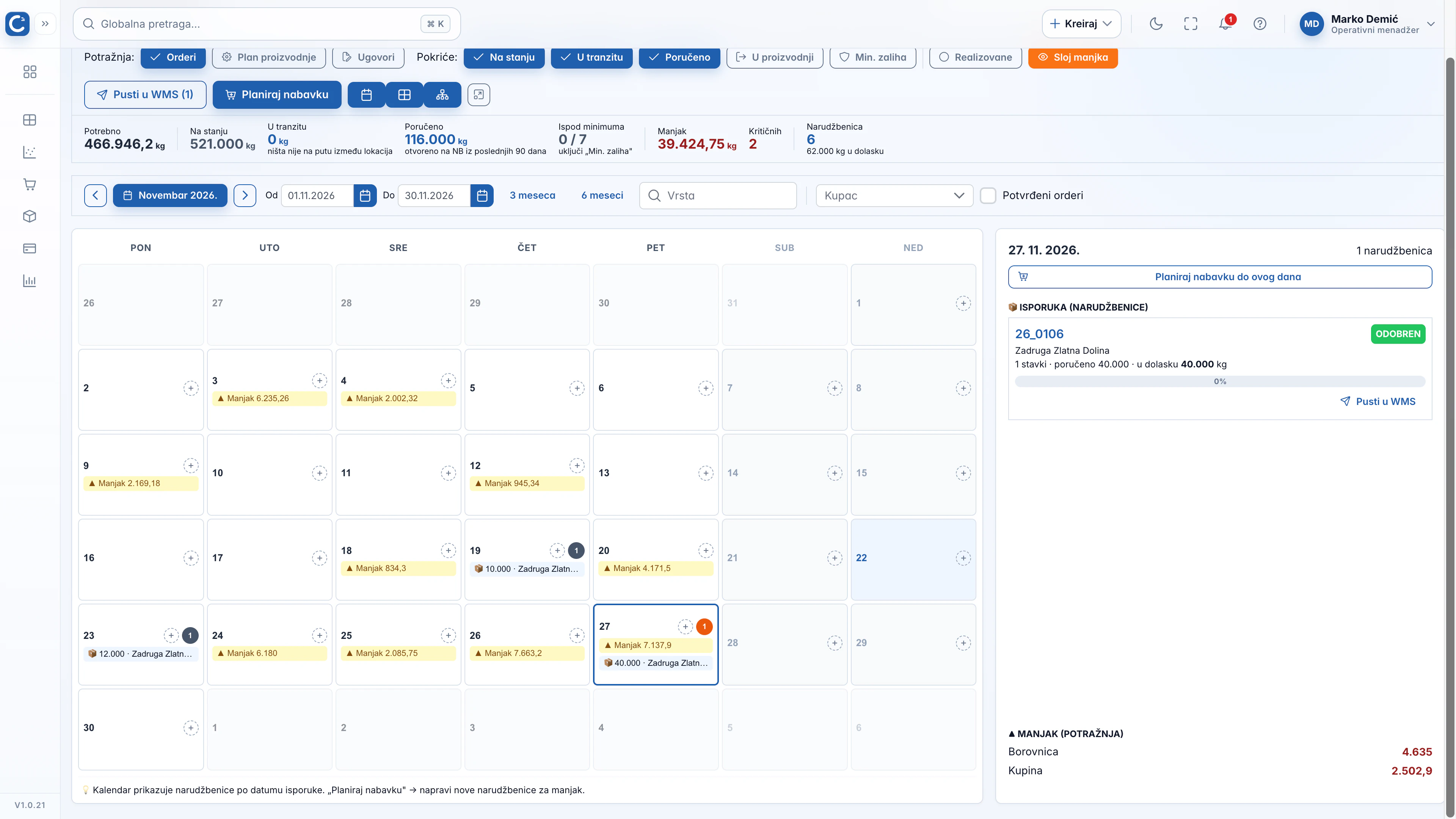
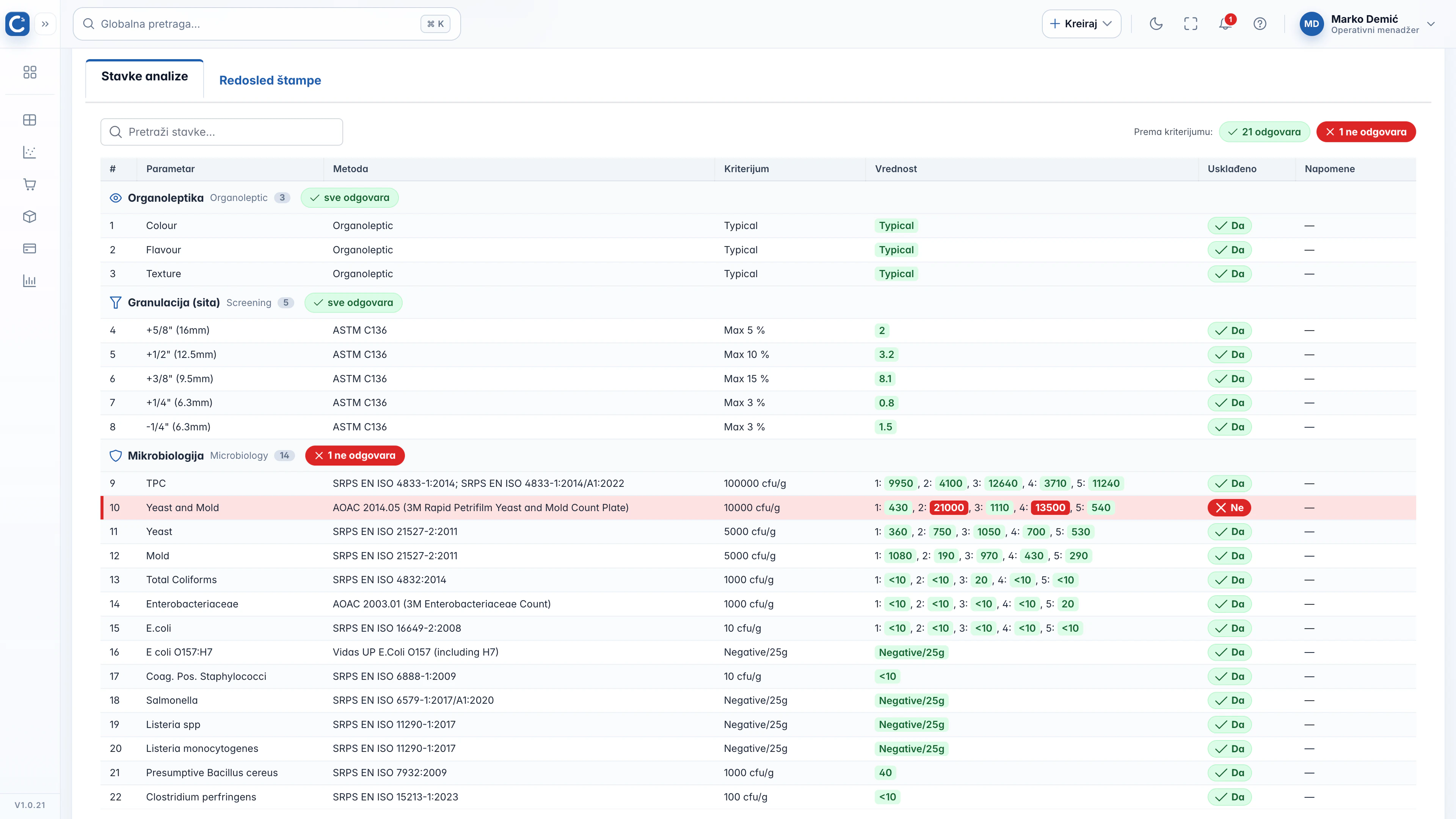
Screenshots with fictional demo data — companies, items and quantities are examples.
NG Operations + NG WMS
A plan that puts the warehouse to work
A warehouse works best when it knows in advance what is coming. Through the plan, NG Operations tells it what arrives from suppliers, what gets produced and what must go to customers — and NG WMS executes and sends back actual quantities, lots and stock, live.
- What arrives
→ NG WMSFrom the purchase order, the warehouse gets the supplier receipt notice — raw materials, consumables or packaging.
← planReceived quantities and goods in transit flow back into the material plan.
- What gets produced
→ NG WMSWork orders with planned consumption and output, lot and location; approving an order creates the material issue, the finished-goods receipt and the return.
← planWhat was actually issued and produced fills plan versus actual on every order.
- What goes to customers
→ NG WMSThe loading plan becomes a customer delivery note, with transport and a location for every line.
← planShipped quantities flow back to the order and into the dashboards.
NG Operations can connect to other WMS products too, and with NG WMS it works natively — as one system.
What sets NG Operations apart
The whole planning cycle in one system — from the date you promise a customer to material that arrives on time and goods that leave checked.
Shift planning by drag and drop
The system proposes a schedule by day and shift based on the loading date, and the planner fine-tunes it by dragging. An order that runs over several shifts skips weekends and holidays on its own.
Materials and packaging per day
The shortage is calculated for every day, taking stock, goods in transit, open purchase orders, waste and minimum stock into account.
Delivery dates everyone confirms
Purchasing, packaging, production and sales confirm the loading date before it is promised to the customer — with a record of who confirmed it and when.
Purchase orders from shortages
One wizard turns the shortage into purchase orders by supplier and date, and the warehouse gets the receipt notice.
BOMs with waste and packaging
Recipes as a percentage of net mass or per unit, with waste, packaging and versions valid from a date.
Laboratory and certificates
Every lot analysed against the customer’s specification, with an automatic verdict, approval and a certificate in English.
Plan versus actual, live
Consumption, output and shipments come back from the warehouse on their own, so every order shows the plan next to the actual.
21 dashboards
Management, sales, production, purchasing, warehouse and lab — with period comparison and insights that single out what is off track.
NG Copilot and MCP
Ask in your own words about the plan, materials and orders; the answer comes with the document, and every proposal waits for your confirmation.
Ask the plan in your own words — the answer comes with the document
NG Copilot answers from your data: the plan, customer orders, material shortages, purchase orders, loading dates and lab results. Every answer comes with the document behind it, every proposal waits for a person to confirm, and the MCP server connects the AI tools your team already uses — under the same user permissions.
NG Copilot
NG Copilot knows your plan
Ask in your own words: can the order ship on Friday, what is next week’s plan short of, which purchase order is late, which lot is still waiting for analysis. Copilot answers from NG Operations data and names the document the answer comes from.
- Answers with a document: order, PO, work order, analysis
- Plan, materials, purchasing and lab in one conversation
- No hunting through screens and spreadsheets
Human in the loop
Proposals wait for your confirmation
When Copilot proposes a next step, nothing changes until a person confirms it. Dates, purchase orders and the plan stay with the teams responsible for them — Copilot cuts the searching and checking.
- Proposal first, confirmation second — never the other way round
- The decision stays with the team that owns it
- No actions on its own
MCP
MCP server
The open Model Context Protocol standard connects the AI tools your team already uses to NG Operations data — with no separate integration for each tool.
- The AI tool your team already uses
- The same rights as the signed-in user
- One connection for every tool that supports MCP
NG Copilot
The week starts with a question, not a round of spreadsheets
The planner asks what needs attention this week, and Copilot goes through orders due for loading, department confirmations, material shortages and incoming purchase orders — naming the document behind every item.
- What is late and what awaits confirmation, in one place
- A document behind every item
- Copilot suggests the next step; a person decides
NG Copilot
Can the order ship on Friday — before you promise the customer
A salesperson asks in their own words, and Copilot checks everything the loading date depends on: materials and incoming purchase orders, the production plan, department confirmations and the lab — then says what is holding the shipment back and which document it knows that from.
- Materials, plan, confirmations and lab in one answer
- The reason and the document for every blocker
- A proposed new date — changed only after confirmation
NG Copilot
Lab status before loading, in one answer
Before loading, sales and quality ask the same thing: are the analyses done, and are there any deviations? Copilot goes through the analyses per lot and says what is approved, what is waiting for approval and where a parameter misses the customer’s specification.
- Analysis status for every lot due for loading
- The measured value next to the customer’s limit
- The lab approves; the warehouse puts goods on hold
MCP
The AI tool your team already uses, connected to the plan
Through the NG Operations MCP server, any AI tool that supports MCP works with customer orders, the plan, purchase orders and analyses — under the signed-in user’s permissions and only with data that user may see.
- No separate integration for each AI tool
- The same permissions as in NG Operations
- A proposed action waits for a person to confirm
- Answers with the document
- Actions only on confirmation
- The same rights as the user
- Decisions stay with the department
- Your rules stay yours
- One standard for AI tools
Every solution, one system
Each solution covers one step of the cycle, and together they work on the same data. Every page shows how the work runs — with real-world scenarios.
Planning
- Sales planningWhat customers need and when — one plan for sales, purchasing and production.
- Material planning (MRP)How much raw material and packaging is short, on which day — and who to order it from.
- Production planningPlans by line, day and shift — from the customer order to the work order in the warehouse and back.
- Bill of materialsOne recipe for purchasing, planning and production — ingredients, waste, packaging and packing in one place.
Purchasing, sales and quality
- PurchasingPurchase orders from the material plan, receipts announced to the warehouse, received quantities back in the plan.
- Sales and deliveryFrom quote and contract to delivery note — and back, with what actually shipped.
- Lab and quality controlCustomer specification, lot analysis, approval and a certificate of analysis (CoA) in English.
- WMS and ERP integrationNG Operations plans, the warehouse executes, actuals flow back into the plan — no retyping.
Insight and AI
- Dashboards21 ready-made dashboards in 6 areas — from lines and yield to live warehouse stock.
- BI reportingFrom total to document: pivot reports on contracts and supplier, customer and item cards.
- NG Copilot and MCPAsk the plan in your own words: the answer comes with the document, and proposals wait for your confirmation.
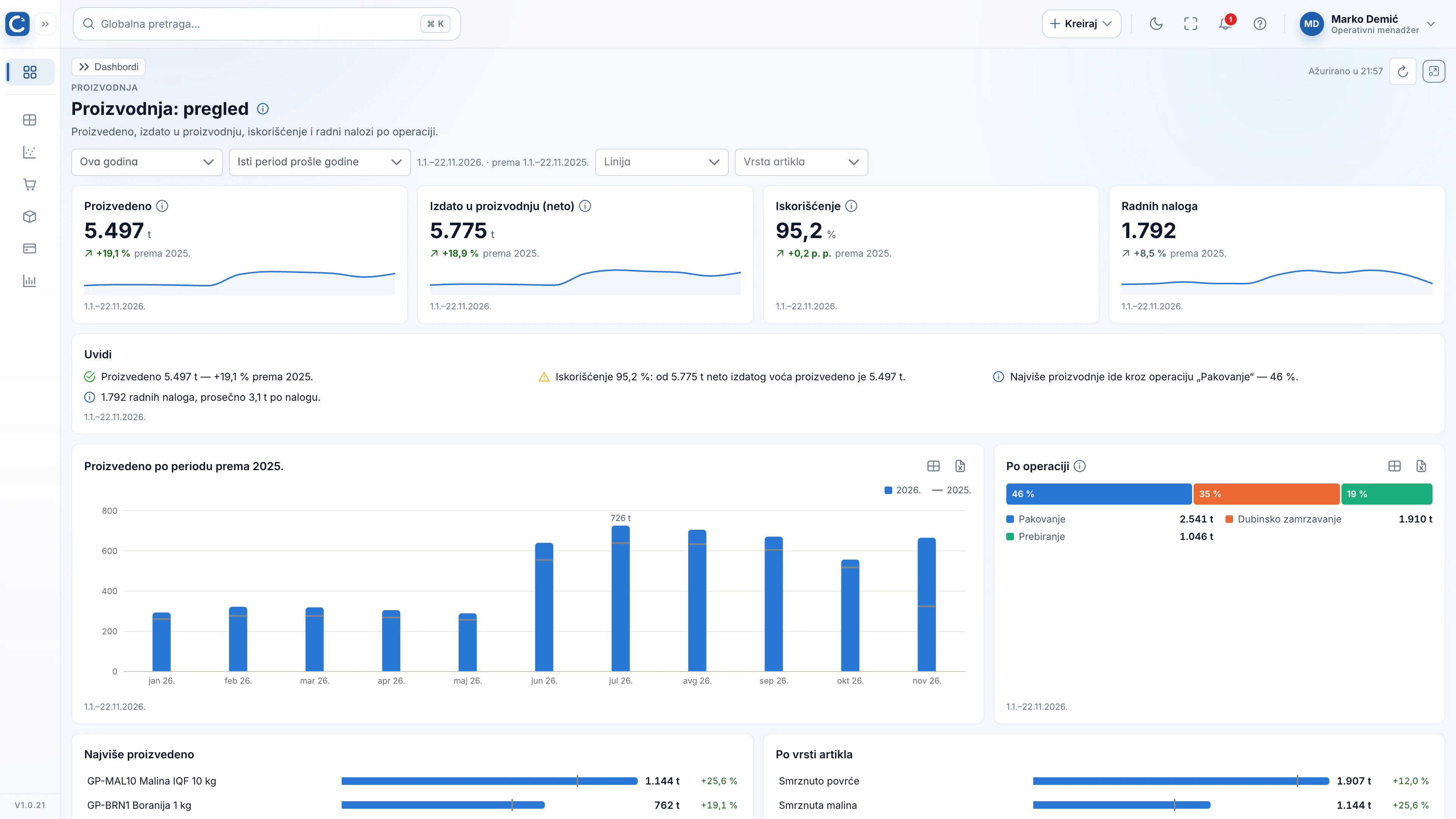
Dashboards and analytics
21 dashboards: the whole of production on one screen
Management, sales, production, purchasing, warehouse and lab — each team has its own views, with comparison to the previous period and insights that single out what is off track.
- Output, kg per working day by line, yield, losses and scrap
- Warnings and risks for management
- Stock and lots straight from the warehouse
- Excel export and full-screen view
For manufacturers who work to customer orders
One system, configured around your products, lines, shifts and customers.
Food manufacturing
Fruit and vegetable processing, frozen products, confectionery and bakery: lots, waste, packaging and certificates for export.
Laboratory and certificatesBeverages and dairy
Many pack sizes and packaging items, short lead times and orders that change at the last minute.
Materials and packagingCosmetics, chemicals and detergents
Recipes as a percentage of mass, waste and packaging, and an analysis of every batch before delivery.
Bills of materialsPlastics, packaging and print
Lines running three shifts, orders spanning several shifts and rush orders in the middle of the week.
Production planningBuilding materials
Customer contracts, seasonal demand, a loading plan and delivery dates confirmed before they are promised.
Sales planningMulti-plant companies
Branches, users per plant and goods in transit between sites, with views for management.
Management dashboards
The ERP keeps the books, NG Operations the plan, NG WMS the goods
NG Operations connects directly to the ERP you already use, works natively with NG WMS and can connect to other WMS products too. Data flows automatically, with no retyping.
We connect to systems such as
- NG One
- Pantheon
- Microsoft Dynamics 365 Business Central
- SAP
- Infosys
- UPIS
- and other ERP systems
- The warehouse gets receipt notices, work orders and delivery notes from the plan
- Actual quantities, lots and stock come back from the warehouse live
- Orders are imported from Excel, reports exported to Excel, and documents printed to PDF or Word
- Every record shows who created, changed and confirmed it
From the first conversation to a plan that works
We run the rollout together with your team, on your own products, lines and orders, with clear steps from the first conversation to go-live.
Rollout plan
After analysis
the timeline depends on processes, lines and integrations
- 01
Free consultation and demo
We get to know your production and show NG Operations on your own products and orders.
- 02
Analysis and proposal
We walk through sales planning, materials, purchasing, production and the lab and agree how each will run in NG Operations.
- 03
Configuration and data
We set up items, bills of materials, lines, shifts and non-working days, and bring over data from Excel or your current system.
- 04
Warehouse and ERP connection
We connect NG Operations to NG WMS or your WMS and to your ERP, and test the exchange on real examples.
- 05
Training and trial run
Planners, purchasing, sales and the lab practise on their own data — before go-live.
- 06
Go-live and support
We stay with you through the switch to NG Operations, and support continues after go-live.
Planning in practice
- Quality6 min read
Certificate of analysis (CoA): what it contains and how it is issued
Many customers, especially in export, won’t accept goods without a certificate of analysis (CoA) for each lot. What a CoA should contain, where the limits come from, why analysis is done per lot and who approves the document before it goes to the customer.
- Production planning8 min read
How to build a production plan: from customer order to a shift on the line
A production plan answers one question: what gets made, on which line, on which day and in which shift, so the goods are ready for loading. Step by step, with an example: from demand and loading dates, through the bill of materials and material availability, to releasing work orders to the warehouse and comparing plan with actuals.
- Purchasing7 min read
Packaging planning in manufacturing: keeping boxes and labels from stopping the line
When a line stops for lack of material, the culprit is often packaging: a box, a film or a label made for one customer. How to calculate packaging requirements per day from orders and bills of materials, how much minimum stock makes sense, and how to split packaging purchases across suppliers.
Frequently asked questions
What is NG Operations?
NG Operations is production planning and management software. It connects the sales plan, raw material, consumables and packaging needs, purchasing, the production plan by line and shift and the lab in one cycle, with dashboards and NG Copilot, an AI assistant. It is developed and supported by Konis Software in Belgrade, Serbia.
Which companies is NG Operations for?
Manufacturers of every kind — food, beverages, cosmetics and chemicals, plastics and packaging, building materials and more — that plan to customer contracts and orders and want the plan, materials, warehouse and quality in one place.
How is NG Operations different from an ERP?
The ERP keeps the books, invoices and finance. NG Operations plans: what to produce, when, on which line and in which shift, what to buy and by when, and whether quality is confirmed before loading. It connects directly to your ERP, so nothing is retyped.
How does NG Operations work with the warehouse?
It is natively connected to NG WMS: it sends the warehouse supplier receipt notices, work orders and delivery notes, and gets back the quantities actually issued, produced and shipped, lots and stock — live. It can connect to other WMS products too.
How is the production plan built?
Production orders are created from customer orders in one step. The system proposes a day and shift based on the loading date, and the planner fine-tunes the plan by dragging orders across lines, days and shifts. Work orders go to the warehouse in one click, with material chosen by available stock.
How does NG Operations know what to buy?
It calculates the need for every day from demand and bills of materials, then subtracts stock, goods in transit, open purchase orders and material already issued, allowing for waste and minimum stock. One wizard turns the shortage into purchase orders by supplier and date.
Does NG Operations include a laboratory?
Yes. The lab manages customer specifications, per-lot analyses with an automatic pass/fail verdict, an approval step and a Certificate of Analysis as a PDF in English.
Does NG Operations run in the cloud or on our own servers?
Both. NG Operations can run in the cloud or on your own servers (on-premise) — you choose according to your data and infrastructure policies.
Which ERP systems does NG Operations connect to?
ERP systems such as NG One, Pantheon, Microsoft Dynamics 365 Business Central, SAP, Infosys and UPIS, among others. The connection is direct and the exchange runs automatically.
Does NG Operations have AI?
Yes. NG Copilot is the AI assistant built into NG Operations: it answers questions about the plan, orders, materials and purchase orders with the document the answer comes from, and every proposal waits for a person to confirm. Through the MCP server, your team’s AI assistants can work with NG Operations too — under the same permissions.
How long does a rollout take?
It depends on the number of products and lines, your processes and integrations. You get an exact plan and timeline after a free consultation and analysis; rollout, training and support are handled by the Konis Software team in Serbia.
How much does NG Operations cost?
The price depends on scope, processes and integrations, so we prepare an offer after a free consultation and demo.
See NG Operations on your own products and orders
A free consultation and demo: we walk through your sales plan, materials, purchasing and production and show how NG Operations and NG WMS would run in your company.
- office@konissoftware.com
- Phone
- +381 66 000 977