Skip to content
NG Operations
Sales and delivery

Sales order management for manufacturers: from quote to shipment, with no retyping.

NG Operations takes a customer through the quote, the contract and the order, and sends the delivery note to the warehouse for execution. What was actually loaded comes back from the warehouse, so sales always knows what was contracted, ordered and shipped — by customer, item and document.

  • Quote → contract → order
  • Excel order import
  • Delivery note to the warehouse
  • Customer card

Free consultation and a demo on your own processes.

The NG Operations planning cycle: Sales plan → Materials and packaging → Purchasing → Production plan → Laboratory → Customer delivery. NG WMS — the warehouse executes the plan: what arrives from suppliers, what gets produced, what goes to customers; actuals flow back into the plan.

In the application

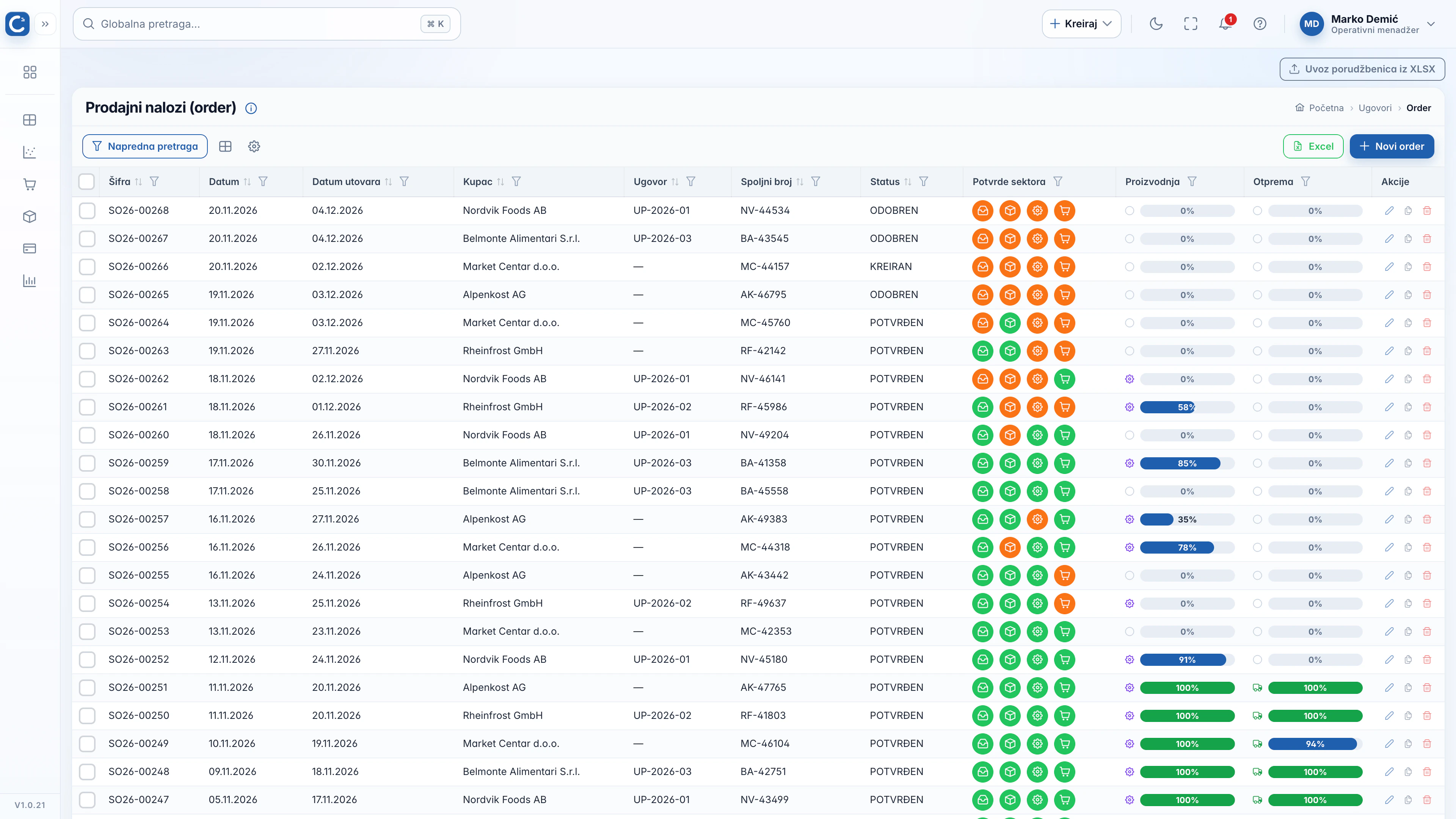
The customer order list: order and loading dates, customer, contract, customer PO, status, sector confirmations and production and shipping progress
Customer orders with sector confirmations and production and shipping progress for every order.Screenshot with fictional demo data. Click for full size.
Capabilities

What sales gets in NG Operations

Commercial terms are entered once, the order drives the plant, and shipments report back by themselves — sales no longer chases information around the warehouse and the shop floor.

  • Quotes and contracts with terms

    An accepted quote becomes a contract, with all its lines, in a single step. The contract carries the delivery period, currency, Incoterms and payment terms, and quantity is optional — for framework contracts that the customer draws down with orders.

  • English documents for export

    Quotes and contracts have English fields — payment terms, transport, description of goods, packaging and required documents — so export customers get their documents in English, as PDF or Word. The laboratory issues the certificate of analysis (CoA) in English.

  • Orders that drive the plant

    A sales order carries the customer, items, quantities, loading date, the customer’s PO number and transport details. Production is planned, materials are ordered and goods are issued against it.

  • Excel order import

    When customers send orders in a spreadsheet, the XLSX is imported in one go: lines are grouped by the customer’s PO number, each PO becomes an order, and customer and product names are matched to your master data.

  • Contract balance on every order

    For lines linked to a contract you see what was contracted, already ordered and still available, and ordering beyond the remaining quantity is flagged with a warning.

  • The delivery note goes to the warehouse

    Confirming an order creates a customer delivery note: customer, transport and the facility for each line go to NG WMS for execution. One order can have several delivery notes — when goods leave from two facilities or in two shipments.

  • Shipped quantities report back

    The warehouse reports what was actually loaded and the status of the delivery note. The “Shipped” bar on the order and in the list shows how much of what was ordered has really gone to the customer.

  • Customer card

    For each customer: contracted → ordered → shipped, by item and down to the individual document, with a fulfilment percentage. “Where are my goods?” is answered from one screen.

  • Contract pivot reports

    The sales contracts report crosses contracts, items and months — contracted, ordered and delivered — and clicking any number opens the documents behind it. Export to Excel.

How it flows

From quote to goods at the customer

The same data flows through every document: what was agreed in the quote reaches the warehouse without being typed again.

  1. 01

    Quote

    A quote with items and terms goes to the customer as PDF or Word, in English where needed.

  2. 02

    Contract

    The accepted quote becomes a contract in one step; the contract sets the delivery period and the terms.

  3. 03

    Order

    The order is created from the contract, by hand or by Excel import, with the loading date and the customer’s PO number.

  4. 04

    Confirmation and delivery note

    Sales confirms the order and the delivery note goes to the warehouse, with customer, transport and facility per line.

  5. 05

    Shipping in the warehouse

    NG WMS picks and loads the goods against the delivery note; status and shipped quantities flow back to NG Operations.

  6. 06

    Fulfilment

    The customer card and the contract report show what was contracted, ordered and shipped — down to the individual document.

Real-world scenario

What it looks like in a real plant

A situation every manufacturer knows — and how NG Operations runs it, step by step.

An export customer sends orders in a spreadsheet

Illustrative example

The situation

A producer of ajvar and preserved vegetables has an annual contract with an importer in Germany. Every other week the importer sends an Excel file with orders for its distribution centres — this time 14 purchase orders with 63 lines in total.

The challenge

When the spreadsheet is retyped by hand, a wrong item code or quantity is only discovered at the loading dock. Contract terms are typed again on every document, the customer wants documents in English, and the warehouse gets its loading list by email.

How it runs in NG Operations

  1. 1The contract with the importer carries its terms in English too — payment, transport, description of goods and packaging — and prints to PDF.
  2. 2The sales rep imports the file: lines are grouped by the customer’s PO number, creating 14 orders matched to the customer and products in master data.
  3. 3The rep checks the orders and, with the bulk action “Generate delivery notes”, creates one delivery note per order from the chosen warehouse.
  4. 4In NG WMS the warehouse receives 14 delivery notes with the customer and lines and prepares the loading.
  5. 5For the lots going into the shipment, the laboratory issues certificates of analysis (CoA) in English, as PDF.
  6. 6After loading, shipped quantities come back from the warehouse, and the customer card shows contracted, ordered and shipped by item.

Who does what

  • Sales repImports the orders, checks them and creates the delivery notes.
  • WarehouseLoads the goods against the delivery notes in NG WMS.
  • LaboratoryIssues certificates of analysis in English for the lots being shipped.

What you gain

Customer orders enter the system without retyping, the warehouse gets delivery notes instead of an email, and the importer gets documents in English. How much of the contract has been delivered is visible by item — with no adding up of spreadsheets.

See how this process works in NG Operations

Illustrative example: the numbers are an example, the steps are the actual workflow in NG Operations.

“Where are my goods?” after a partial delivery

Illustrative example

The situation

A manufacturer of tile adhesives and mortars has two plants. A distributor ordered 30 tonnes for a building site: the adhesives are made in one plant and the mortars in the other. After the first truck, the distributor calls: what has left, and what is still to come?

The challenge

When shipments are tracked by phone, the sales rep calls the warehouse in both plants, adds up delivery notes and answers only once everything is pieced together — sometimes wrongly. A partial delivery looks complete until the customer counts the pallets.

How it runs in NG Operations

  1. 1The rep confirms the order without the automatic delivery note, because the goods leave from two plants and in two shipments.
  2. 2In the order’s delivery notes section, they create two delivery notes — one per plant — choosing the lines and quantities for each.
  3. 3Each warehouse receives its delivery note in NG WMS, with the customer and lines, and loads the goods.
  4. 4Shipped quantities come back from the warehouse: the “Shipped” bar on the order shows that the adhesives have gone and the mortars are still waiting.
  5. 5Clicking a delivery note on the order shows what the warehouse announced, picked and actually loaded — with no call to the warehouse.
  6. 6The rep answers from the customer card: ordered, shipped and remaining, by item and document.

Who does what

  • Sales repSplits the order into delivery notes and answers the customer from the customer card.
  • Warehouse staff in both plantsLoad the goods against their own delivery notes in NG WMS.
  • Commercial directorFollows fulfilment by customer and contract in the reports.

What you gain

The customer gets an accurate answer from one screen, not after a tour of two warehouses. A partial delivery shows as partial, and the remainder has its own document and its own warehouse.

See how this process works in NG Operations

Illustrative example: the numbers are an example, the steps are the actual workflow in NG Operations.

Sales, warehouse and books — each does its part

NG Operations runs the sales documents and announces shipments, the warehouse executes them, and your ERP keeps the books.

NG Operations announces

A customer delivery note, with lines, customer, transport and facility, goes to the warehouse as soon as the order is confirmed.

NG WMS executes

The warehouse picks the goods, loads them and approves the delivery note; another WMS connected to NG Operations can do the same.

Actuals flow back

Shipped quantities and statuses return to the order, the customer card and the contract reports. Your ERP — NG One, Pantheon, Microsoft Dynamics 365 Business Central, SAP or another — connects directly.

Frequently asked questions

Is NG Operations a CRM?

No. NG Operations has no leads and no sales pipeline: sales here starts with a quote, a contract or a customer order and ends with shipping and fulfilment. The aim is for what has been sold to be delivered accurately and on time.

How does an order reach the warehouse?

Confirming an order creates a customer delivery note with the lines, the customer, transport details and the facility the goods leave from. The delivery note goes to NG WMS (or another connected WMS), the warehouse loads the goods against it, and shipped quantities flow back to the order.

Can orders be imported from Excel?

Yes. When customers send orders in an Excel file (XLSX), the import groups the lines by the customer’s PO number and creates an order for each, matching customer and product names to your master data. The file needs to follow an agreed template.

Can quotes and contracts be in English?

Yes. Quotes and contracts have English fields for payment terms, transport, description of goods, packaging and required documents, and they print to PDF or export to Word. The laboratory issues the certificate of analysis (CoA) as a PDF in English.

Can one order have several delivery notes?

Yes — when goods leave from two facilities, in two shipments or partially. A delivery note with selected lines and quantities is created from the order, and for many orders at once delivery notes are generated in bulk, one per order.

How do we track how much a customer has drawn down on a contract?

On the contract, every item shows the delivered and remaining quantities. The customer card follows contracted → ordered → shipped down to the individual document, and the sales contracts pivot report crosses contracts, items and months, with export to Excel.

Who issues invoices?

Invoices and accounting stay in your ERP, which NG Operations connects to directly — NG One, Pantheon, Microsoft Dynamics 365 Business Central, SAP and others. NG Operations runs the sales documents, shipping and fulfilment.

Related

  • Quality6 min read

    Certificate of analysis (CoA): what it contains and how it is issued

    Many customers, especially in export, won’t accept goods without a certificate of analysis (CoA) for each lot. What a CoA should contain, where the limits come from, why analysis is done per lot and who approves the document before it goes to the customer.

  • Sales planning6 min read

    Confirming delivery dates: how to promise customers a date you can keep

    Sales knows what the customer wants, but not whether the packaging will arrive or whether a line has a free shift. Why sales shouldn’t promise a loading date alone, what purchasing, packaging and production check first, and how department sign-offs and the loading plan keep the promise on paper and on the shop floor.

Want to see how this would look in your production?

In a free consultation and demo we walk through your sales plan, materials and production in NG Operations and show how the plan connects to the warehouse.